Meta Tags for SEO: The Complete Guide to Title Tags, Descriptions & More
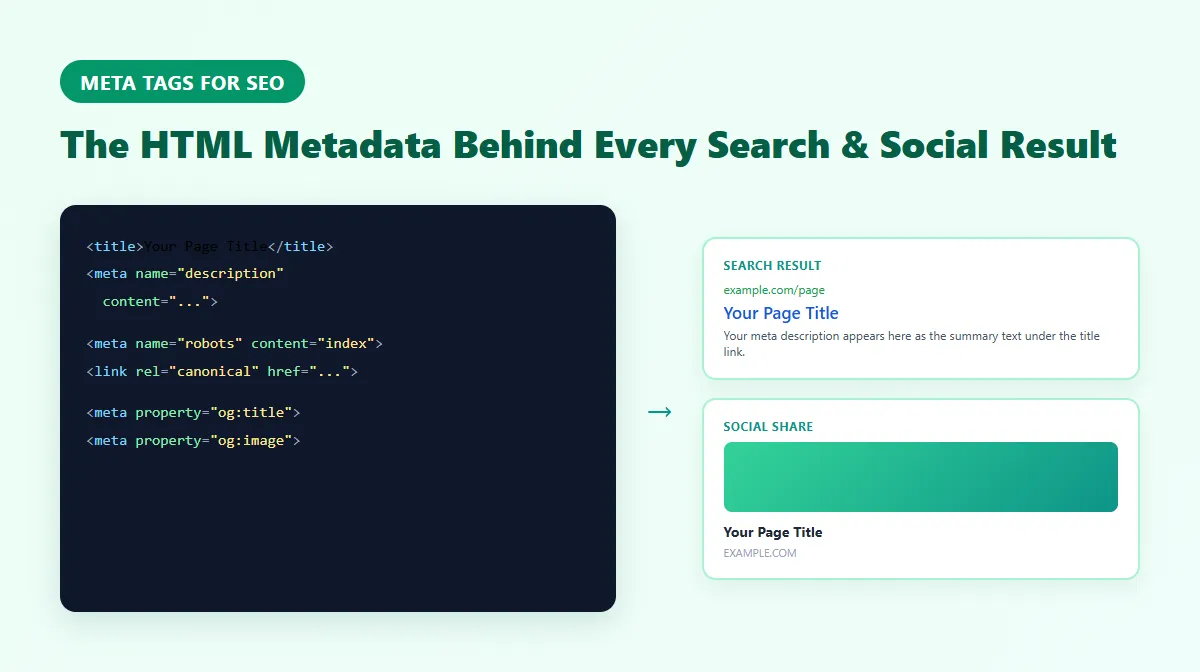
Meta tags are the HTML metadata that tells search engines and social platforms what your page is about — the title tag and meta description you write directly shape how your page appears in search results, and other tags control how it looks when shared on social media or how crawlers are allowed to treat it.
Get them wrong, and a well-ranked page can still get skipped over in search results. Get them right, and the same ranking position can earn meaningfully more clicks. This guide covers meta tags for SEO end to end: what they actually are, how title tags and meta descriptions work, and a practical overview of robots, canonical, Open Graph, and Twitter/X metadata — with sourced, accurate guidance rather than invented rules.
What Are Meta Tags and Why They Matter for SEO
Meta tags are snippets of code that live in a page's <head> section, invisible to visitors but read by search engines, browsers, and social platforms. Strictly speaking, only elements written as <meta ...> are "meta tags" — the <title> element and the <link rel="canonical"> element are technically separate HTML elements — but in everyday SEO conversation, all of these are usually grouped together as part of a page's metadata.
Here's a quick reference to the metadata that actually matters, and how deeply this guide covers each one:
| Element | What it does | SEO/search role | Covered here |
|---|---|---|---|
<title> | Sets the page title | Major on-page SEO factor; source for the search-result title link | In depth (below) |
| Meta description | Summarizes the page | Not a ranking factor, but shapes click-through rate | In depth (below) |
| Meta robots | Tells crawlers whether to index/follow a page | Controls indexing and crawling | Concise overview (below) |
Canonical (<link rel="canonical">) | Declares the preferred URL for duplicate/similar content | Helps avoid duplicate-content and cannibalization issues | Concise overview (below) |
| Viewport | Controls mobile rendering | Supports mobile usability, not a direct ranking signal itself | Brief (below) |
| Charset | Declares character encoding | Technical correctness, not an SEO factor | Brief (below) |
| Open Graph | Controls how links look when shared socially | No direct effect on Google rankings; affects social CTR | Concise overview (below) |
| Twitter/X Card | Twitter/X-specific share metadata | Same as Open Graph, platform-specific | Brief, alongside Open Graph |
| Meta keywords | Lists keywords for the page | Not used by Google as a ranking signal | Brief myth-busting note |
Title Tag Optimization: The Ultimate Guide
Your title tag is one of the most important pieces of text on your page from an SEO perspective. It needs to do two things at once: describe the page accurately enough for search engines to understand it, and be compelling enough that a searcher wants to click it.
How Long Should a Title Tag Be?
There's no fixed character limit that Google enforces. What actually happens: Google generates the title link shown in search results from a mix of sources — your <title> element, on-page headings, and other prominent text — and displays as much as fits within a limited pixel width before truncating or rewriting it entirely. Google's own Search Central documentation on title links confirms this directly, and Google has stated there is no fixed upper character limit, only that longer titles are more likely to be truncated or rewritten.
As practical guidance, not a rule: keeping a title tag to roughly 50-60 characters makes truncation less likely on both desktop and mobile. Treat this as a helpful target, not a requirement.
Here's a bad title tag:
Home Page - Welcome to Our Amazing Website
Here's a good one:
Meta Tag Generator - Create SEO Title Tags Free | ProURLMonitor
The good one includes a clear keyword phrase, a benefit, and the brand name — descriptive, not stuffed, and reasonably concise.
Title Tag Best Practices
1. Lead with your main keyword. Google gives more weight to text near the beginning of a title, so put your primary topic first rather than burying it after generic words.
2. Include your brand name. Adding your brand at the end (separated by a pipe "|" or dash "-") supports recognition and can help returning visitors spot your result.
3. Use it to describe, not to stuff. Words like "Free," "Complete," or "Guide" can help when they're accurate — but a title should read naturally to a human, not just contain keywords. "SEO Tools SEO Audit SEO Checker" reads as spam; "Free SEO Tools: Audit Your Site in Seconds" reads as a real title.
4. Make every title unique. Every page on your site should have its own title tag. Duplicate titles make it harder for search engines to tell your pages apart and waste ranking opportunities.
Common Title Tag Mistakes
The most common mistake is being too generic — "Products - Company Name" tells a searcher nothing about what's being sold. Be specific about what the page actually offers.
Keyword stuffing is another frequent problem: titles like "Buy Shoes Online | Cheap Shoes | Best Shoes | Shoes Sale" read as spam, and Google may respond by rewriting the title entirely in search results. One clear keyword phrase, used once, is more effective than repeating variations.
Finally, don't waste characters on filler like "Welcome to" or "Official Website of" — that space is better spent on what the page actually offers.
Meta Description Best Practices
Your meta description is your pitch to a searcher deciding whether to click your result over the nine others on the page.
How Long Should a Meta Description Be?
As with title tags, Google does not publish a fixed character limit for meta descriptions. Google's own guidance on writing meta descriptions states there's no length limit, but the snippet shown in search results is truncated as needed to fit the available space — and Google may generate the snippet from your page's own content instead of your supplied meta description, if it believes that better matches what the searcher is looking for.
As practical guidance: roughly 150-160 characters is a commonly used target that's less likely to be cut off on desktop. Mobile can display less. Treat this as a helpful target, not a Google requirement.
What Makes a Good Meta Description
Think of it as ad copy for your page. It should:
1. Reflect your target topic naturally. Google bolds terms in the snippet that match the search query, which draws the eye — but this should read naturally, not as a keyword list.
2. Communicate a clear, specific value. "Discover free SEO tools to check HTTP status codes, audit your website, and boost rankings" is more useful to a reader than "We offer various SEO services."
3. Include a call to action where it fits. Phrases like "Learn more" or "Get started free" can nudge a click, without needing to sound like an ad.
4. Match what the searcher is actually looking for. A description promising a step-by-step guide should lead to a step-by-step guide, not a sales pitch.
Does a Meta Description Affect SEO Rankings?
No — a meta description is not a direct Google ranking factor, and Google has confirmed this. What it does influence is click-through rate, which can indirectly affect performance over time: if two pages rank similarly but one earns meaningfully more clicks because its description is more compelling, that's a real advantage even though the description itself isn't scored by Google's ranking systems.
It's also worth knowing that Google may choose to generate a snippet from your page's own content instead of the meta description you wrote, when it judges that content to be a better match for the query. This is expected, documented behavior — if you see different text in search results than what you wrote, that's usually why.
Meta Robots: Controlling Indexing and Crawling
The <meta name="robots"> tag tells search engine crawlers how to treat a specific page. The most common directives are:
- index / noindex — whether the page should be allowed to appear in search results at all
- follow / nofollow — whether crawlers should follow the links on the page
- nosnippet — prevents a text snippet or preview from being shown in search results
A simple example:
<meta name="robots" content="noindex, nofollow">
This tells crawlers not to index this page and not to follow its links — commonly used for admin pages, staging content, or thank-you pages you don't want appearing in search.
The same directives can also be set at the HTTP response level via an X-Robots-Tag header, which is useful for non-HTML files like PDFs where a meta tag isn't an option.
One important caution: the absence of a noindex directive does not by itself guarantee a page is indexed. It only means this specific signal isn't blocking indexing — actual indexing also depends on crawlability, content quality, and Google's own decisions. For the full set of directives (noarchive, max-snippet, max-image-preview, and more), how noindex interacts with robots.txt, and common mistakes, see our dedicated Meta Robots Tag guide.
Canonical URLs: Telling Search Engines Which Version Counts
The <link rel="canonical"> element isn't technically a <meta> tag, but it belongs to the same page-metadata ecosystem and is worth understanding alongside it. It declares which URL should be treated as the authoritative version when the same or very similar content is reachable at more than one address (a common situation with tracking parameters, printer-friendly pages, or www vs. non-www URLs).
A simple example:
<link rel="canonical" href="https://example.com/preferred-page/">
Every page should generally have a self-referencing canonical — a canonical tag pointing to its own URL — as a baseline signal of which version is intended to be indexed. When true duplicates exist, pointing the duplicates' canonical tags at one preferred URL helps consolidate ranking signals instead of splitting them across near-identical pages.
Google treats the canonical tag as a signal, not an absolute directive — if there's strong evidence pointing elsewhere, Google's own systems can choose a different URL to index regardless of what the canonical tag says. For a full breakdown — self-referencing canonicals, cross-domain use, common mistakes, and how canonical differs from a redirect — see our dedicated Canonical Tag guide.
Open Graph and Twitter/X Cards for Social Sharing
Open Graph tags (og: tags) control how a page looks when shared on Facebook, LinkedIn, WhatsApp, Slack, and other platforms that support the Open Graph protocol. These are separate from your SEO title and description, so you're free to write them differently.
According to the official Open Graph protocol, the four required basic properties are:
<meta property="og:title" content="Your Page Title">
<meta property="og:type" content="website">
<meta property="og:image" content="https://example.com/image.jpg">
<meta property="og:url" content="https://example.com/page">
og:description is useful, commonly-added metadata for a social preview's supporting text, but it is not one of the four required basic properties — a distinction worth knowing since it's often mislabeled as required.
Images make a shared link more clickable, which is one reason it's worth setting og:image even though it's technically optional. A widely used size is 1200×630 pixels, which displays well across most platforms without cropping oddly.
Twitter/X Cards work alongside Open Graph rather than replacing it. If you don't set Twitter/X-specific tags (twitter:card, twitter:title, twitter:description, twitter:image), X commonly falls back to your existing Open Graph tags — but fallback behavior isn't identical across every platform, so it's still worth setting your own twitter:card (typically summary_large_image) if social presentation on X specifically matters to you.
For the full picture — all four required OG properties, og:image sizing, structured image tags, Twitter/X Card types, and how og:url differs from a canonical tag — see our dedicated Open Graph Tags guide.
Technical Metadata: Viewport, Charset, and Meta Keywords
A few more tags round out a page's metadata, each worth knowing even though none deserves the depth given to title tags above.
Viewport. <meta name="viewport" content="width=device-width, initial-scale=1"> tells the browser how to size and scale a page on mobile devices, which is foundational for responsive design. It supports mobile usability rather than acting as a direct ranking signal on its own.
Charset. <meta charset="UTF-8"> declares the character encoding used by the page, ensuring text (including accented characters, symbols, and non-Latin scripts) displays correctly. This is a technical-correctness requirement, not an SEO lever.
Meta keywords. <meta name="keywords" content="..."> once listed target keywords for a page. Google has not used this tag as a ranking signal since 2009, per its own long-standing public statements, so there's no SEO benefit to adding it — and its absence isn't a problem worth fixing.
How to Use Our Free Meta Tag Generator Tool
Writing meta tags by hand means counting characters and remembering several different tag formats. The ProURLMonitor Meta Tag Generator handles that for you:
Step 1: Enter your title tag. As you type, the tool suggests a description and keywords based on it.
Step 2: Watch the character counter, which flags when you're approaching or over a practical length target.
Step 3: Add optional fields — page URL, social image, site name — to generate your Open Graph and Twitter Card tags automatically.
Step 4: Preview how the result will look in a Google-style search snippet, a Facebook share, and a Twitter/X share.
Step 5: Copy the generated HTML and paste it into your page's <head>.
Testing and Validating Your Meta Tags
Already have tags published on a live page and want to see what's actually there instead of writing new ones? Use the Meta Tag Checker to fetch a real URL and inspect the actual title, meta description, canonical, robots, Open Graph, and Twitter/X metadata returned in that page's server HTML — along with a SERP preview and a social preview built from the real extracted values.
For social-platform-specific previews, two official tools are still useful:
- Facebook Sharing Debugger — shows exactly how a URL's Open Graph tags will render on Facebook, and lets you force a re-scrape after changes.
- LinkedIn Post Inspector — previews how a URL will appear when shared on LinkedIn.
(Twitter/X's own Card Validator has been discontinued and no longer works without an X login, so it isn't included here — the Meta Tag Checker above covers the same "what tags does this page actually have" question without depending on it.)
Google Search Console is also worth checking regularly — its Coverage and Performance reports can surface missing metadata and show how a page's real click-through rate is trending, which is more useful than any fixed benchmark.
Advanced Meta Tag Strategies for E-Commerce Sites
If you run a store with hundreds or thousands of product pages, writing unique meta tags for each one by hand isn't realistic. Use dynamic templates instead — for example:
Title: [Product Name] - [Category] | [Brand]
Description: Buy [Product Name] - [Key Features]. [Price]. [Availability].
Your CMS can populate these variables from your product database automatically. The important part is making sure the variables actually produce distinct text per product — a template that results in hundreds of pages all reading "Buy our product - great features, low price" defeats the purpose.
Structured data can reinforce this further — our Schema Markup Generator helps add product schema (price, availability, ratings) that can support rich results alongside your meta tags.
Tracking Meta Tag Performance and Making Improvements
Google Search Console's Performance report shows impressions, clicks, and click-through rate for every page you rank for. If a page has high impressions but low clicks, its title and description are a reasonable place to start investigating.
There's no single "normal" CTR figure to compare against — it varies by query type, search intent, competing SERP features (ads, featured snippets, image packs), device, and brand recognition, among other things. Rather than chasing an external benchmark, compare a page's CTR against its own historical baseline in Search Console, change one element (title or description) at a time, and give it a few weeks to gather enough data before judging the result.
Also check your Keyword Density to make sure your meta tags and content stay aligned without stuffing, and use the Heading Analyzer to confirm your H1 matches your title tag's theme.
Frequently Asked Questions
What are meta tags?
Meta tags are HTML elements in a page's <head> that describe the page to browsers, search engines, and social platforms rather than to visitors reading the page. The <title> element and the <link rel="canonical"> element are technically separate from <meta> tags specifically, but they're part of the same page-metadata ecosystem and are usually discussed together as "meta tags" in everyday use.
Which meta tags matter most for SEO?
For most sites, the title tag and meta description matter most because they directly shape how a page appears in search results and influence click-through rate. The meta robots tag and canonical tag matter for controlling indexing and avoiding duplicate-content issues. Open Graph and Twitter/X Card tags don't affect Google rankings directly, but they control how a page looks when shared on social platforms.
Does Google use the meta keywords tag?
No. Google has not used the meta keywords tag as a ranking signal since 2009. You can leave it out entirely with no SEO downside.
How long should a title tag be?
There's no fixed Google character limit. As practical guidance, keeping a title tag under roughly 50-60 characters makes it less likely to be visually truncated in search results, but Google generates the displayed title link from multiple sources — not only your <title> element — and can rewrite it entirely.
How long should a meta description be?
There's no fixed Google character limit here either. Roughly 150-160 characters is a common practical target that's less likely to be cut off, but Google may also generate a snippet from your page's own content instead of your meta description, depending on the search query.
Meta Tags Are Worth Getting Right
Great content still needs someone to click through to it. Meta tags are your first impression in search results and on social media — the title tag and meta description shape whether someone clicks, and robots, canonical, and Open Graph metadata shape how your page is treated and presented once they do.
Start with the Meta Tag Generator to write new tags, the Meta Description Generator if you need help drafting descriptions from existing content, and the Meta Tag Checker to see what's actually live on a page today. For a broader technical and on-page review beyond metadata, run the SEO Audit tool.
Try Our Free SEO Tools
Put what you learned into action with our free SEO analysis tools.