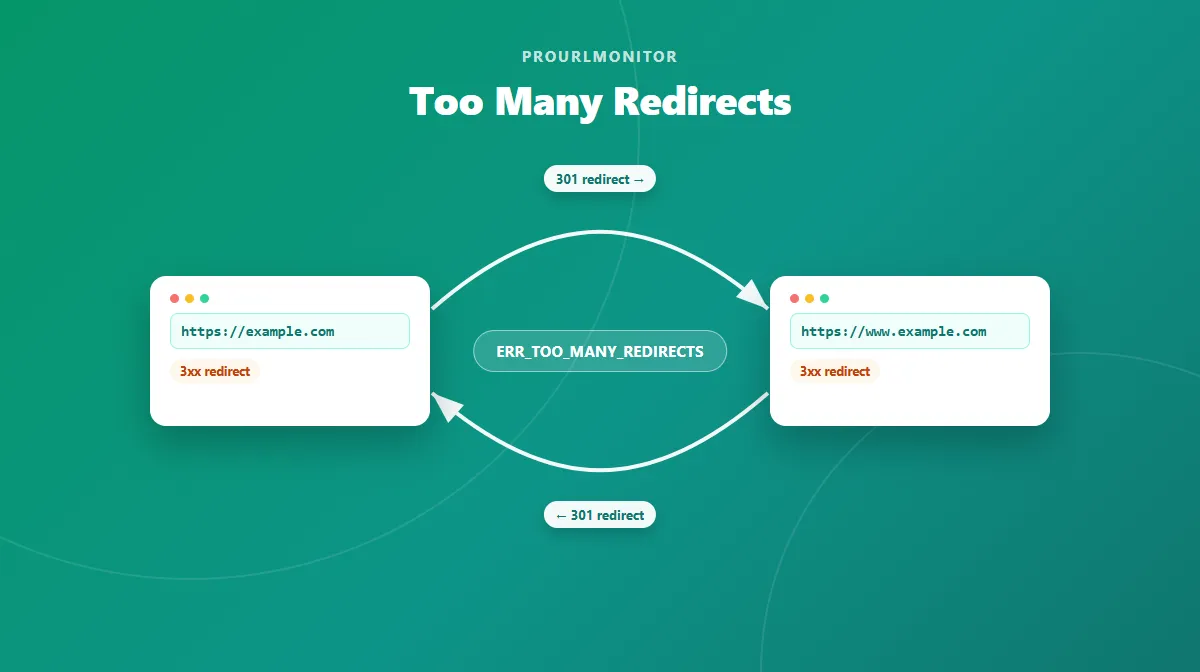
Too Many Redirects: What It Means and How to Fix It
A "too many redirects" error means a URL never reached a stable final page. Your browser followed one redirect, then another, and kept getting sent back to a URL it had already visited — so it gave up instead of showing you content. It's almost always caused by a redirect loop or a conflict between two redirect rules, not a problem with your device or internet connection.
This guide explains what the error means, what a redirect loop actually is, the most common causes, and a practical diagnostic sequence for fixing it.
What Does "Too Many Redirects" Mean?
Redirects themselves are a completely normal part of the web. When a URL has moved, a server sends back a 3xx status code and a new location, and the browser follows it automatically. Most redirects resolve in one or two hops and you never notice them happening.
"Too many redirects" is what happens when that process doesn't resolve. Instead of eventually landing on a page that returns content, the request keeps getting redirected — either cycling between the same URLs or chaining through so many hops that the browser assumes something is broken and stops trying.
Different browsers describe this the same underlying problem in different words:
| Browser | Message shown |
|---|---|
| Chrome | ERR_TOO_MANY_REDIRECTS |
| Firefox | "The page isn't redirecting properly" |
| Safari | "Safari can't open the page because too many redirects occurred" |
Whatever the wording, the meaning is the same: the redirect path failed to reach a stable destination.
What Is a Redirect Loop?
A redirect loop is when a URL, directly or after a few hops, redirects back to a URL that was already part of the same request — so the chain never reaches a final page. In the simplest case:
URL A → URL B → URL A → URL B → ...
URL A sends the browser to URL B, and URL B sends it right back to URL A. Each hop looks valid on its own, but together they form a cycle with no exit. The browser (or a crawler, or a tool like a redirect checker) can detect this by noticing that a URL it already visited has shown up again in the same chain, and stops the request rather than following it forever.
A loop doesn't have to involve only two URLs — it can run through three, four, or more addresses before it cycles back to one it already visited. The defining feature isn't the number of hops; it's that the path never terminates on a page that actually returns content.
What Causes Too Many Redirects?
Most redirect loops trace back to one of a fairly small set of causes. They're not equally common — the first few below account for the large majority of real-world cases:
- Conflicting HTTP ↔ HTTPS redirect rules. One layer forces HTTP to HTTPS while another forces that same HTTPS request back to HTTP.
- Conflicting www ↔ non-www rules. Different layers disagree about which host is canonical and keep redirecting to each other.
- Incorrect WordPress Site URL / Home URL configuration. A mismatch between the two settings can send every request back through the redirect logic.
- Plugin-generated redirect conflicts, most often when a caching, SSL, or redirect-management plugin makes a rule that overlaps with one already in place elsewhere.
- CDN or reverse-proxy SSL configuration conflicts, particularly when the proxy and the origin server disagree about whether the connection is already encrypted.
- Server-level
.htaccessor Nginx redirect rules that reference each other, or that were left in place from an earlier migration. - Application-level redirects (inside a CMS or app) that conflict with a redirect already handled at the server or proxy layer.
- Authentication or session redirect loops, where a login flow keeps sending a user back to a login page instead of the page they requested.
- Stale browser cookies, in a narrower set of cases — this affects one visitor's browser rather than the site itself, and is worth ruling out but rarely the actual root cause.
The rest of this guide walks through how to identify which of these applies and fix it.
How to Fix Too Many Redirects
Work through this sequence in order. Each step rules out one layer, so you don't waste time changing server configuration for what turns out to be a browser-side issue, or vice versa.
1. Check the Redirect Path First
Before changing any configuration, see exactly what's happening. Our Redirect Checker follows a URL's redirects manually, hop by hop, and shows the status code, the destination, and whether the protocol changed at each step. It stops as soon as it detects a repeated URL and flags the result as a loop, so you can see precisely which addresses are involved instead of guessing.
Paste the affected URL in, run the check, and look at the chain: how many hops happened before it stopped, whether the protocol (HTTP/HTTPS) or host (www/non-www) changed between hops, and which URL repeats. That one result usually points straight at the cause in the list above — for example, seeing HTTP → HTTPS → HTTP → HTTPS repeating tells you the protocol rules are fighting each other before you've touched a single config file.
2. Test Whether the Problem Is Browser-Specific
Open the same URL in a private/incognito window, or in a different browser entirely. If the error disappears, the cause is local to your original browser — most likely a stale cookie or a cached redirect from a rule that has since changed.
If the error still happens in a private window, on a different browser, or on another device or network, the redirect path itself is broken server-side. Clearing cookies or cache won't fix that, because there's nothing wrong with what's stored locally — the server (or CDN, or app) is genuinely sending back a redirect that leads nowhere. Don't spend time on browser-side fixes once you've confirmed the loop is server-side.
3. Check HTTP and HTTPS Redirect Rules
A very common pattern is two layers disagreeing about which protocol is correct:
- One layer (a CDN, load balancer, or
.htaccessrule) redirects every HTTP request to HTTPS. - Another layer (the application, or a different server rule) redirects that same HTTPS request back to HTTP — often because it's misreading the connection as insecure, or because an old rule was never removed.
The fix is to make sure exactly one layer owns the HTTP → HTTPS redirect, and that no other layer sends traffic back the other way. Which layer should own it depends on your setup, but there should only ever be one.
4. Check www and Non-www Redirects
Redirecting one host to the other is completely normal and safe — for example, sending www.example.com to example.com (or the reverse) so there's a single canonical version. The problem shows up when two different layers pick opposite directions: one rule sends www → non-www, while another sends non-www → www, and the request bounces between hosts indefinitely.
As with HTTP/HTTPS, the fix is consistency: pick one canonical host and make sure every layer (server, CDN, application) redirects toward it, not away from it.
5. Check WordPress URL Settings
If the affected site runs WordPress, check Settings → General for the WordPress Address (URL) and Site Address (URL) fields. These two values should match your site's actual, intended address — same protocol, same host. A mismatch between them (one on HTTP, one on HTTPS, or one with www and one without) is a well-documented cause of redirect loops, because WordPress uses these values to construct its own internal redirects.
If a caching or SSL plugin is also involved, be aware that some of them cache old redirect responses — a URL setting fix may not visibly take effect until that cache is cleared. Avoid editing these values directly in the database unless you're comfortable with that; the Settings screen is the safer path for most cases.
6. Check Redirect Plugins
If more than one plugin manages redirects, SSL enforcement, or caching, they can end up issuing conflicting rules for the same URL without either plugin being "wrong" on its own. Review what each active plugin is configured to do for the affected URL, and look for two rules that send traffic in opposite directions (the same HTTP/HTTPS or www pattern described above, just configured through a plugin instead of a server file).
7. Check CDN / Reverse Proxy / SSL Settings
If the site sits behind a CDN or reverse proxy, check how its SSL/TLS mode is configured relative to the origin server. A common source of loops is when the proxy is set to a mode that connects to the origin over plain HTTP, while the origin server itself redirects every HTTP request to HTTPS — the proxy and the origin end up disagreeing about whether the connection is already secure, and the request bounces between them.
The safer long-term fix in that situation is to install a valid SSL certificate on the origin server and set the proxy's encryption mode to fully validate that certificate end-to-end, rather than only encrypting the visitor-facing half of the connection. If the proxy also has an "always redirect to HTTPS" style setting turned on, make sure the origin server isn't separately redirecting that same HTTPS request back to HTTP — that combination reintroduces the same loop from the other direction.
8. Check Server Redirect Rules
At the server level — an Apache .htaccess file or an Nginx server block — look for redirect rules that were added over time, possibly during past migrations, and never fully cleaned up. A rule that redirects a path back to itself, or two rules that each redirect to the other's target, will produce a loop regardless of what's happening at the CDN or application layer.
Back up your configuration file before editing it. A broken .htaccess or Nginx config can take down the entire site, not just the URL you're troubleshooting, so test changes on a staging copy where possible and keep the original file to restore from if something goes wrong.
9. Recheck the Redirect Path
After making a change, don't assume it worked — verify it. Run the URL back through the Redirect Checker and confirm three things: the chain now ends on a real page instead of repeating, the number of hops is reasonable (ideally one, not a long chain of unnecessary redirects), and the status codes returned match what you intended. If the loop is gone but you're still seeing more hops than expected, that's worth cleaning up separately — extra hops slow down every visit even once the actual loop is fixed.
If the cause was a sitewide rule — a CDN, proxy, or server config change — it likely didn't just affect the one URL you diagnosed. Run the rest of the affected section through the Bulk Redirect Checker to confirm the fix cleared the loop everywhere it was happening, not just on the URL you happened to test first.
Redirect Loop Examples
These are illustrative examples, not real measurements from any specific site.
Example 1 — www/non-www loop:
https://example.com/
  → https://www.example.com/
  → https://example.com/
  → https://www.example.com/  (loop detected)
Here, one rule sends the non-www version to www, while a different rule sends www back to non-www. Neither redirect is wrong in isolation — the problem is that they point in opposite directions.
Example 2 — protocol loop:
http://example.com/page
  → https://example.com/page
  → http://example.com/page
  → https://example.com/page  (loop detected)
A proxy or CDN redirects HTTP to HTTPS, while the origin server (misreading the incoming connection) redirects that HTTPS request back to HTTP.
Too Many Redirects vs. Redirect Chain
A "too many redirects" error is specifically caused by a loop — a redirect path that circles back on itself and never resolves. That's a different situation from a redirect chain, which is simply a longer-than-ideal sequence of redirects that does eventually reach a real page:
| Redirect chain | Redirect loop | |
|---|---|---|
| Pattern | A → B → C → final page | A → B → A → B → ... |
| Reaches a final page? | Yes, eventually | No |
| Main downside | Slower, harder to maintain | Page is completely unreachable |
A long chain is worth cleaning up because every extra hop adds latency and makes the redirect setup harder to reason about, but it isn't the same failure as a loop, and it won't trigger a "too many redirects" error on its own.
A Note on Redirect Status Codes
Redirect loops can involve any of the 3xx status codes — 301, 302, 307, or 308 — and mixed types are common in a real loop (for example, a permanent redirect on one hop and a temporary one on the next). The specific status code doesn't change whether a given path is a loop; what matters is whether the chain of Location headers eventually revisits a URL it already passed through.
Frequently Asked Questions
What does too many redirects mean?
It means your browser followed a chain of redirects and never reached a stable final page. Instead of landing on real content, the request kept bouncing between two or more URLs until the browser gave up and stopped the request. It's almost always caused by a redirect loop or conflicting redirect rules, not a problem with your internet connection.
What is a redirect loop?
A redirect loop is when URL A redirects to URL B, and URL B redirects back to URL A (or eventually back to a URL already visited), so the request cycles endlessly instead of ending on a real page. It can involve just two URLs or a longer chain that eventually loops back on itself.
How do I fix too many redirects?
Start by checking the actual redirect path with a redirect-checking tool to see where the loop happens. Then work through the likely causes in order: browser-specific issues first (try a private window), then HTTP/HTTPS and www/non-www redirect rules, then WordPress URL settings or redirect plugins if applicable, then CDN/proxy SSL settings, and finally server-level redirect rules in .htaccess or Nginx config.
Can cookies cause too many redirects?
Occasionally, yes — a stale session cookie or an old cached redirect can cause a loop that only affects your browser, not other visitors. But most "too many redirects" errors come from a genuine server-side misconfiguration, and clearing cookies won't fix those. If the error also happens in a private/incognito window or on another device, the cause is server-side.
Can HTTP and HTTPS redirects create a loop?
Yes, this is one of the most common causes. It happens when one layer of your setup (like a CDN or proxy) redirects HTTP to HTTPS, while another layer (like your server or CMS) redirects that same HTTPS request back to HTTP, creating an endless back-and-forth between the two protocols.
How do I find which URL is causing a redirect loop?
Use a redirect-checking tool that follows each hop and stops when it detects a repeated URL. That shows you exactly which URLs are involved in the loop and which layer (protocol, host, or server rule) is sending the request back where it came from.
Are too many redirects bad for SEO?
A redirect loop prevents both users and search engine crawlers from reaching the intended page, so the URL can't be crawled, indexed, or ranked while the loop persists. This is different from a normal, intentional redirect (like a 301 to a new URL), which is a standard and safe part of site maintenance.
Try Our Free SEO Tools
Put what you learned into action with our free SEO analysis tools.