What Is an XML Parser and How Does XML Parsing Work?
An XML parser is the piece of software that makes XML actually usable: it reads raw XML text and turns it into a structured document a program can navigate, search, and modify, rather than a flat block of characters. Every browser has one built in, and every mainstream programming language ships a parsing library, because almost nothing that touches XML - a formatter, a validator, an RSS reader, a configuration loader - works directly on the raw text. It works on what the parser produces.
This guide covers what a parser actually does, the two main approaches to parsing (DOM and SAX), what "well-formed" means and why it's a hard requirement rather than a style preference, and how parsing relates to - but isn't the same as - formatting or validating XML.
What Is an XML Parser?
An XML parser is a program (or library) that reads XML text and recognizes its structure according to the rules defined by the XML specification: which characters open and close a tag, how attributes are written, what marks the start and end of a comment or a CDATA section, and so on. Recognizing that structure is what lets the parser build something more useful than a string - a document, made up of typed nodes: elements, attributes, text, comments, and a few other node kinds.
Parsers exist at every layer of software that touches XML. Browsers have one built in (DOMParser, and the same underlying engine that renders SVG and reads RSS feeds). Standard libraries in Python, Java, C#, PHP, and virtually every other language include one. Command-line tools like xmllint wrap one. None of them re-implement XML's grammar from scratch for each use case - they all sit on top of a parser that does the actual reading.
How XML Parsing Works: From Text to a Document Tree
At a high level, parsing an XML document goes through the same stages regardless of which language or library is doing it:
- Read the raw characters. The parser scans the input text (after resolving encoding, since XML can be UTF-8, UTF-16, or another declared encoding).
- Recognize tokens. It identifies the building blocks as they appear: the start of a tag, an attribute name and value, a chunk of text, a comment, a CDATA section, a processing instruction.
- Enforce XML's grammar rules. Every opening tag must have a matching closing tag (or be self-closed), tags must nest without overlapping, there must be exactly one root element, and attribute values must be quoted. This is what "well-formed" means.
- Build or emit structure. Depending on the parser type, it either assembles a full tree of node objects (DOM) or emits an event for each recognized piece as it goes (SAX).
- Stop and report an error the moment a rule is broken. A parser doesn't guess at a "best effort" interpretation of broken XML - an unclosed tag or mismatched nesting produces a parse error, not a partial document.
That last point matters more than it might seem. It's the reason a real parser-based tool is safe to build reformatting or validation logic on top of, and why a regex-based text search for < and > is not: a parser understands context (this > is inside a quoted attribute value, so it isn't a tag boundary), where a text search only sees characters.
DOM Parsing: Building the Whole Tree in Memory
A DOM (Document Object Model) parser reads the entire document and constructs a complete tree of node objects before returning anything. Every element becomes a node with a list of child nodes, an element's attributes become accessible by name, and text becomes its own node type. Once parsing finishes, you have a documentElement (the root) and can walk, search, or modify the tree freely - the entire structure is held in memory at once.
This is the natural choice whenever code needs to inspect or change specific parts of a document, jump between arbitrary nodes, or serialize the (possibly modified) structure back out afterward - which is exactly what a formatter or beautifier needs to do. The tradeoff is memory: a DOM tree's size scales with the document's size, since the whole thing is resident at once.
SAX Parsing: Streaming Events Instead of a Tree
A SAX (Simple API for XML) parser takes a different approach: instead of building a tree, it reads through the document once and calls a handler function for each piece it encounters - "an element named book just started," "here's some text," "the book element just ended." Nothing is held in memory beyond whatever the calling code chooses to track itself.
That makes SAX parsing well suited to very large XML files, or streaming scenarios where the whole document may not even be available at once. The cost is that there's no random access - if code needs to look ahead, look back, or hold onto structure for later, it has to build and maintain that state manually, since the parser itself never assembles one.
DOM vs SAX: Which One to Use
Neither approach is strictly better - they suit different jobs:
| DOM | SAX | |
|---|---|---|
| Output | A full in-memory tree | A stream of events |
| Memory use | Scales with document size | Roughly constant |
| Random access to structure | Yes | No (must be built manually) |
| Good fit for | Editing, formatting, querying specific nodes | Very large files, one-pass extraction |
A tool that needs to reformat a document, rearrange nodes, or let a user query arbitrary parts of it - anything where the whole structure needs to exist at once - is a DOM job. A one-pass task like "extract every <price> value from a multi-gigabyte feed" is a better fit for SAX, since it never needs the rest of the document in memory to do that.
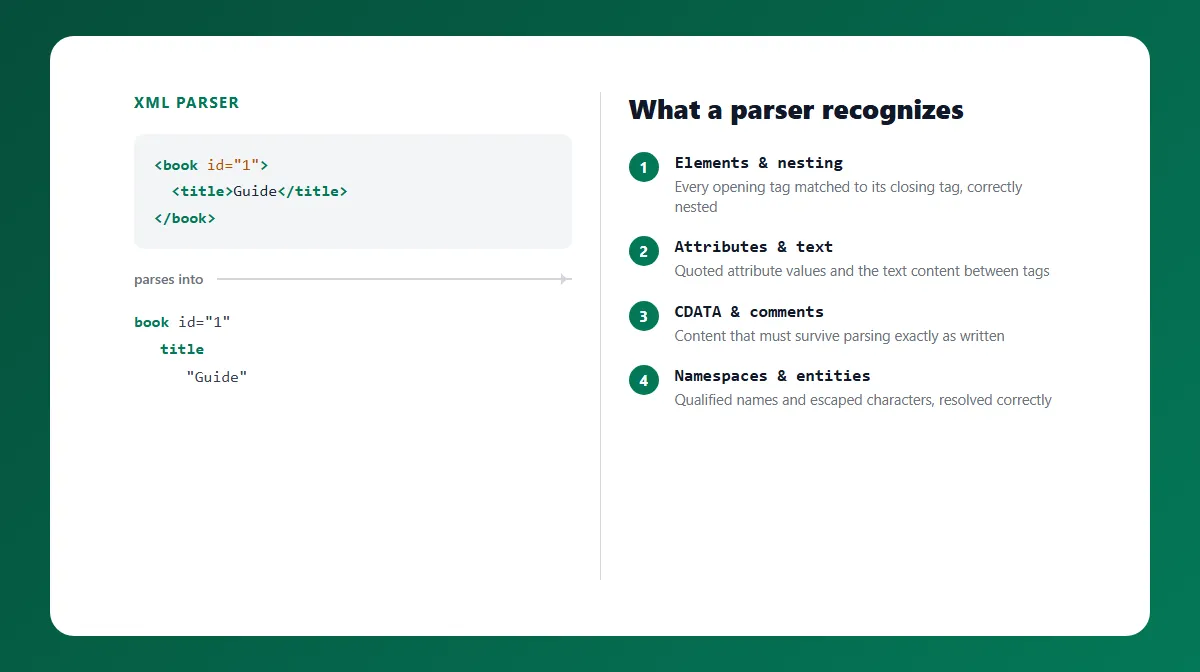
What a Parser Actually Recognizes
Part of what makes parsing more involved than a simple text search is the range of distinct constructs XML defines, each with its own rules:
- Elements and nesting - the tag structure itself, which must nest correctly.
- Attributes - name/value pairs inside a start tag, always quoted, which may legally contain characters like
>inside the quoted value without that closing anything. - Text nodes - the content between tags, including meaningful whitespace that a parser must not silently discard.
- CDATA sections (
<![CDATA[ ... ]]>) - a block whose entire content is treated as literal text, even if it contains characters like<or>that would otherwise need escaping. - Comments (
<!-- ... -->) - content a parser recognizes and preserves but that isn't part of the document's actual data. - Processing instructions (
<?target data?>) - instructions to an application, distinct from the XML declaration itself. - Namespaces - a mechanism for qualifying element and attribute names (e.g.
xmlns:x="...") so documents can mix vocabularies from different sources without name collisions. - Entities - both the five built-in ones (
&,<,>,",') and numeric character references, which a parser resolves back to the literal character they represent.
A parser has to correctly distinguish all of these from one another - recognizing, for instance, that a > inside a CDATA section, a comment, or a quoted attribute value is not a tag boundary, while an unescaped > in ordinary text would be a syntax error. That distinction is exactly what separates real parsing from a naive text search for angle brackets.
Well-Formedness and Parser Errors
"Well-formed" is XML's baseline requirement: every tag closed, correct nesting, one root element, quoted attributes, and properly escaped special characters. A parser checks this as an unavoidable side effect of parsing - there's no way to build a document tree from text that breaks these rules, because the tree-building step itself depends on knowing where every element actually starts and ends.
When a document isn't well-formed, a parser doesn't produce a partial or best-guess tree. It reports a parse error - typically naming roughly where the problem is - and returns nothing usable. That's a meaningful design property to build on: any tool that formats, queries, or transforms XML by first parsing it inherits this same all-or-nothing behavior, refusing to act on broken input rather than silently producing a mangled result.
Parsing vs Formatting vs Validating XML
These three terms get used loosely, but they're distinct operations that happen to build on each other:
- Parsing converts XML text into a structured document. It's a prerequisite for the other two.
- Formatting (also called beautifying or pretty printing) takes a parsed document and re-serializes it with added indentation and line breaks for readability - it changes only presentation, never the underlying structure or content.
- Validating checks a document against rules beyond well-formedness. Well-formedness validation confirms the syntax is correct; schema validation (against a DTD or XML Schema/XSD) goes further, checking that specific elements and attributes match a defined structure and data types.
A document can be well-formed - and therefore parse successfully - while still failing schema validation, or while having no schema at all to validate against. Our XML Formatter & Validator is a practical example of the parse-first approach described in this article: it parses XML with the browser's own DOMParser, checks well-formedness as part of that same step, and only then walks the resulting document tree to produce formatted or minified output - never reformatting the raw text directly.
XML Serialization: Turning the Tree Back Into Text
Serialization is the reverse of parsing: turning a document tree back into XML text. It matters for anything that modifies or reformats a document, since the in-memory tree isn't useful to store, transmit, or display until it's written back out as text. A correct serializer has to re-encode entities, preserve namespace declarations, and write out CDATA sections, comments, and processing instructions using the same node data the parser originally produced - which is why parse-then-serialize (rather than parse-then-text-manipulate) keeps the round trip faithful to the original content.
A Security Note: XXE
XXE (XML External Entity) is worth understanding conceptually even outside of writing parser code directly. Some XML parsers, if configured to do so, will resolve external entities - references inside the XML that point to an external file or URL - and substitute their content into the document. If a parser processing untrusted input is configured to allow that, an attacker can use it to read local files or trigger unintended network requests from the parsing server. Well-maintained parsers and libraries disable external entity resolution by default precisely because of this risk, and it's a large part of why parsing untrusted XML server-side deserves careful library configuration rather than a hand-rolled parser.
Browser-Based vs Server-Side XML Parsing
Browsers expose XML parsing directly through the DOMParser API, giving web pages a standards-compliant parser with no library to install - the same engine a browser uses internally to handle SVG and RSS. Processing XML entirely in the browser also means the document never has to leave the user's machine, which is a meaningful difference for anyone handling sensitive configuration files or data exports.
Server-side parsing, by contrast, typically goes through a language's XML library (such as Java's javax.xml.parsers, Python's xml.etree.ElementTree or lxml, or PHP's DOMDocument) and is the more common choice when XML needs to be processed as part of a backend pipeline - though it's also where entity-resolution settings and XXE protection actually need to be configured deliberately, since a server may be parsing XML from untrusted sources.
Related Tools
If you need to format, minify, or check the well-formedness of an XML document rather than parse one programmatically, the XML Formatter & Validator handles all three directly in your browser, built on exactly the parse-then-serialize approach this article describes.
Try Our Free SEO Tools
Put what you learned into action with our free SEO analysis tools.