How to Convert Octal to Hexadecimal: Steps & Examples
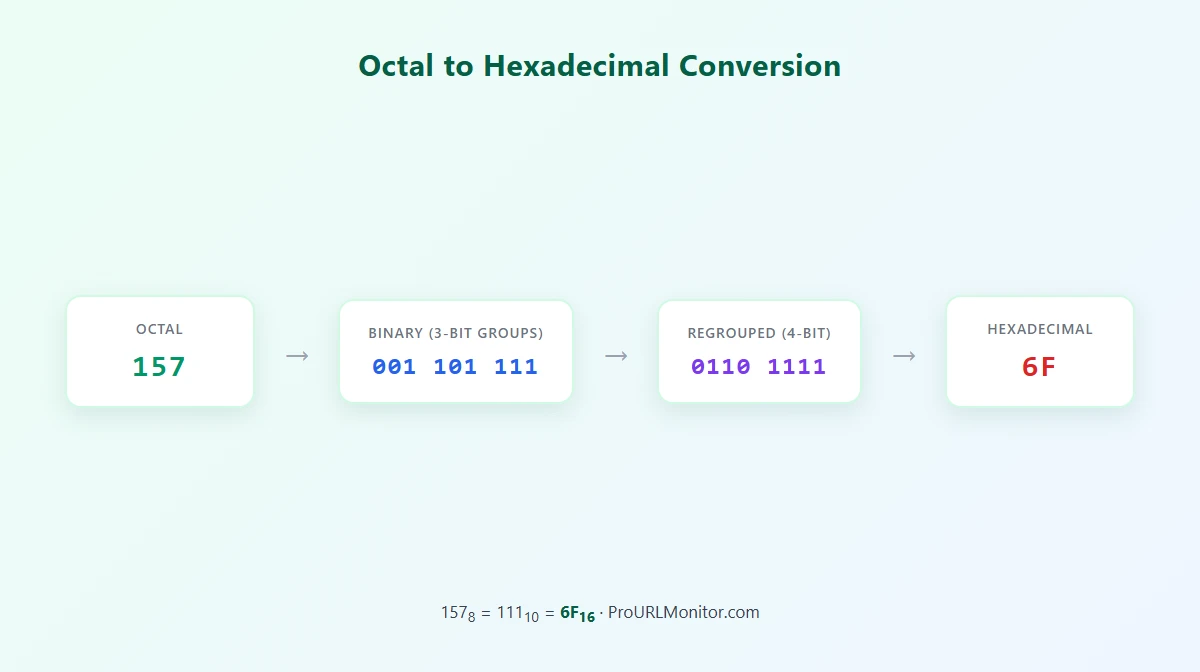
To convert octal to hexadecimal, replace each octal digit with its 3-bit binary equivalent, join the groups together, then regroup the binary digits into sets of four starting from the right and convert each 4-bit group to its hexadecimal digit. For example, octal 157 becomes binary 1101111, which regroups into 0110 and 1111 — hexadecimal 6F. So 157₈ = 6F₁₆. This guide covers why binary works as the bridge between the two bases, both conversion tables, a repeatable step-by-step process, and several verified examples of increasing difficulty.
What Are Octal and Hexadecimal?
Octal is a base-8 number system. It uses only eight digit symbols — 0 through 7 — so a digit like 8 or 9 never appears in a valid octal number.
Hexadecimal is a base-16 number system. Once its digits run out at 9, it borrows six letters for the remaining values:
| Hex | Decimal |
|---|---|
| 0-9 | 0-9 |
| A | 10 |
| B | 11 |
| C | 12 |
| D | 13 |
| E | 14 |
| F | 15 |
Both are positional number systems, like decimal: each digit's value depends on where it sits, representing a power of 8 or a power of 16 rather than a power of 10.
Why Binary Makes Octal-to-Hex Conversion Easy
Octal and hexadecimal don't share an obvious relationship on their own — one is base 8, the other base 16, and neither is a power of the other. But both are powers of 2, and that's what makes binary a convenient bridge between them:
- 8 = 2³, so one octal digit always represents exactly 3 binary bits.
- 16 = 2⁴, so one hexadecimal digit always represents exactly 4 binary bits.
Converting octal straight to binary is direct digit substitution with no carrying or borrowing, since octal's eight possible digit values (0-7) line up exactly with the eight values 3 bits can hold (000-111). The same is true going from binary to hex: sixteen possible values per hex digit (0-15) line up exactly with the sixteen values 4 bits can hold (0000-1111). Chaining those two direct substitutions — octal to binary, then binary to hex — avoids doing octal-to-hex place-value math directly. For a closer look at either half individually, see How to Convert Octal to Binary and How to Convert Binary to Hex.
Octal to Binary Conversion Table
| Octal | Binary |
|---|---|
| 0 | 000 |
| 1 | 001 |
| 2 | 010 |
| 3 | 011 |
| 4 | 100 |
| 5 | 101 |
| 6 | 110 |
| 7 | 111 |
Binary to Hexadecimal Conversion Table
| Binary | Hex |
|---|---|
| 0000 | 0 |
| 0001 | 1 |
| 0010 | 2 |
| 0011 | 3 |
| 0100 | 4 |
| 0101 | 5 |
| 0110 | 6 |
| 0111 | 7 |
| 1000 | 8 |
| 1001 | 9 |
| 1010 | A |
| 1011 | B |
| 1100 | C |
| 1101 | D |
| 1110 | E |
| 1111 | F |
Together, these two tables are the entire method: look up each octal digit's 3-bit group, join them, then look up each 4-bit group's hex digit.
How to Convert Octal to Hexadecimal Step by Step
- Write the octal number and confirm every digit is 0-7.
- Convert each octal digit to its 3-bit binary equivalent using the octal-to-binary table above.
- Join the binary groups together in the same order as the original digits.
- Regroup the combined binary digits into sets of four, starting from the right.
- Pad the leftmost group with leading zeros if it ends up with fewer than four bits.
- Convert each 4-bit group to its hex digit using the binary-to-hex table above.
- Join the hex digits in the same order as their groups.
Example: Convert 157 Octal to Hexadecimal
Step 1 — Octal to binary (3 bits per digit):
Octal digit:   1     5     7
3-bit group: 001   101   111

Combine: 001101111 (normalizes to 1101111)

Step 2 — Regroup into 4 bits from the right:
1101111 → 110 | 1111
Pad the leftmost group: 0110 | 1111

Step 3 — Binary to hex:
0110 = 6
1111 = F

157₈ = 6F₁₆
Checking the result through decimal confirms it: 157₈ = (1 × 64) + (5 × 8) + (7 × 1) = 111₁₀, and 6F₁₆ = (6 × 16) + (15 × 1) = 96 + 15 = 111₁₀. Both sides agree: 157₈ = 111₁₀ = 6F₁₆.
More Octal to Hex Examples
| Octal | Binary (Normalized) | Hexadecimal |
|---|---|---|
| 7 | 111 | 7 |
| 100 | 1000000 | 40 |
| 377 | 11111111 | FF |
| 755 | 111101101 | 1ED |
| 1234 | 1010011100 | 29C |
A couple of these are worth walking through, since they show details the 157 example doesn't:
Octal 100 — digit by digit: 1 → 001, 0 → 000, 0 → 000, combined as 001000000, normalized to 1000000. Regrouped from the right into 4-bit sets: 100 | 0000, padded to 0100 | 0000 → hex 4 and 0 → 40. The internal zeros stay exactly where they are; only the non-significant leading zero was dropped during normalization.
Octal 377 — 3 → 011, 7 → 111, 7 → 111, combined as 011111111, normalized to 11111111 (only one leading zero to drop). Regrouped: 1111 | 1111 → hex F and F → FF. This is the largest 3-digit octal value (377₈ = 255₁₀), and 255 is also the largest value a single byte (two hex digits) can hold — which is why FF shows up so often in programming contexts.
Every row above was cross-checked by converting the same octal value to decimal and confirming the hex result equals the same decimal number — for instance, octal 755 = 493 in decimal, and hex 1ED also equals (1 × 256) + (14 × 16) + (13 × 1) = 493.
If you'd rather not do the digit-by-digit lookup by hand, the Octal Converter converts any octal value to decimal, binary, and hexadecimal at once, or use the Base Converter for a general base-8-to-base-16 conversion.
Alternative Method: Octal to Decimal to Hexadecimal
Binary grouping isn't the only valid route — converting through decimal works too, and it's a useful way to double-check a binary-grouping result.
Step 1: Octal to decimal. Multiply each octal digit by its power-of-8 place value and add the results:
157₈ = (1 × 8²) + (5 × 8¹) + (7 × 8⁰) = 64 + 40 + 7 = 111₁₀
Step 2: Decimal to hexadecimal. Divide repeatedly by 16 and read the remainders from bottom to top:
111 ÷ 16 = 6 remainder 15  →  15 = F
  6 ÷ 16 = 0 remainder 6   →   6 = 6

Reading bottom to top: 6F

111₁₀ = 6F₁₆
Both routes agree: 157₈ = 6F₁₆. For the full octal-to-decimal method, see How to Convert Octal to Decimal; for the decimal-to-hex half, see How to Convert Decimal to Hexadecimal.
Which Method Is Better?
For manual conversion, octal-to-binary-to-hex is usually more convenient because both steps are direct digit substitution — there's no multiplication, division, or remainder tracking involved, just table lookups. The octal-to-decimal-to-hex route is equally valid and involves the same underlying math either way, but it adds an extra arithmetic step (positional multiplication, then repeated division) instead of two substitution passes. Neither method is "faster" in every situation — for a single short octal number done by hand, the binary route tends to involve less arithmetic, but the decimal route doubles as a solid way to verify a binary-grouping answer, which is exactly how the 157 example was checked above.
Common Octal-to-Hex Conversion Mistakes
- Using an invalid octal digit. Octal only has eight digit symbols, 0-7. A digit like 8 or 9 has no 3-bit mapping and was never valid octal to begin with.
- Mapping an octal digit to the wrong 3-bit group. Each digit converts independently using the octal-to-binary table — skipping ahead or misreading a row shifts every bit after it.
- Regrouping binary from the left instead of the right. Hex grouping must start at the rightmost bit; grouping from the left misaligns every 4-bit group and produces a different, incorrect value.
- Using 3-bit groups when converting binary to hex. Groups of three bits belong to octal, not hex — the binary-to-hex step always uses groups of four.
- Padding on the wrong side. Any padding needed to complete the leftmost 4-bit group goes on the left, never the right — padding on the right changes which power of 2 each bit represents.
- Dropping zeros that aren't leading. Only the non-significant zeros at the very front of the combined binary value can be removed; zeros in the middle or at the end are significant and change the value if dropped.
- Confusing A-F values. Each letter stands for one specific value — A=10 through F=15 — mixing them up produces the wrong hex digit even when the binary grouping was correct.
- Treating octal digits as decimal place values. Octal 52 isn't "fifty-two"; it's 5 × 8 + 2 = 42 in decimal. Applying base-10 place values to an octal number gives a wrong starting point for any further conversion.
- Confusing octal-to-hex with hex-to-octal. The two conversions use the same tables but run in opposite directions — applying the wrong direction gives a plausible-looking but incorrect result. See How to Convert Hex to Octal for the reverse direction.
How to Check an Octal-to-Hex Answer
Two reliable ways to verify a conversion by hand:
- Recheck each group. Walk back through the octal number one digit at a time, confirm its 3-bit group, re-join the bits, and confirm the 4-bit regrouping from the right — matching each group against the tables above.
- Compare decimal values. Convert both the original octal number and your hex answer to decimal, as shown in the alternative method above — if they match, the conversion is correct.
The Octal Converter shows the decimal, binary, and hexadecimal equivalents for any octal input side by side, so you can cross-check a manual answer instantly.
Frequently Asked Questions
How do you convert octal to hexadecimal? Replace each octal digit with its 3-bit binary equivalent, join the groups together, then regroup the resulting binary digits into sets of four starting from the right, padding the leftmost group with zeros if needed. Convert each 4-bit group to its hex digit and join the results. For example, octal 157 becomes binary 1101111, which regroups into 0110 and 1111 — hexadecimal 6F.
Why can binary be used to convert octal to hexadecimal? Octal is base 8 (8 = 2³) and hexadecimal is base 16 (16 = 2⁴), so both bases are powers of 2. Binary sits between them as a common bridge: one octal digit always equals exactly 3 bits, and one hex digit always equals exactly 4 bits, so converting octal to binary and then regrouping into hex avoids the positional-value math that a direct base-8-to-base-16 conversion would otherwise require.
How many binary bits represent one octal digit? Exactly 3 bits. Octal has eight possible digit values (0-7), and 3 binary bits can represent exactly eight values (000-111), so the ranges match perfectly.
How many binary bits represent one hexadecimal digit? Exactly 4 bits. Hexadecimal has sixteen possible digit values (0-15, written as 0-9 and A-F), and 4 binary bits can represent exactly sixteen values (0000-1111), so the ranges match perfectly.
What is 157 octal in hexadecimal? 157 (base 8) equals 6F in hexadecimal. Converting digit by digit gives binary 001101111, which normalizes to 1101111. Regrouped into 4-bit sets from the right (0110 and 1111), that's hex 6 and F, or 6F. Checking through decimal confirms it: 157₈ = 111₁₀ = 6F₁₆.
Can you convert octal to hexadecimal through decimal? Yes. Convert the octal number to decimal using powers of 8, then convert that decimal value to hexadecimal using repeated division by 16. It produces the same result as the binary-grouping method — for example, octal 157 converts to decimal 111, and 111 converts to hex 6F either way.
What digits are valid in octal? Only 0 through 7. Octal is a base-8 number system, so a digit like 8 or 9 is never valid and has no 3-bit binary mapping.
What do A through F mean in hexadecimal? They're the six extra digit symbols hexadecimal needs beyond 0-9, representing decimal values 10 through 15: A=10, B=11, C=12, D=13, E=14, F=15.
Try Our Free SEO Tools
Put what you learned into action with our free SEO analysis tools.