Orphan Pages: What They Are, SEO Impact & How to Find Them
What Is an Orphan Page?
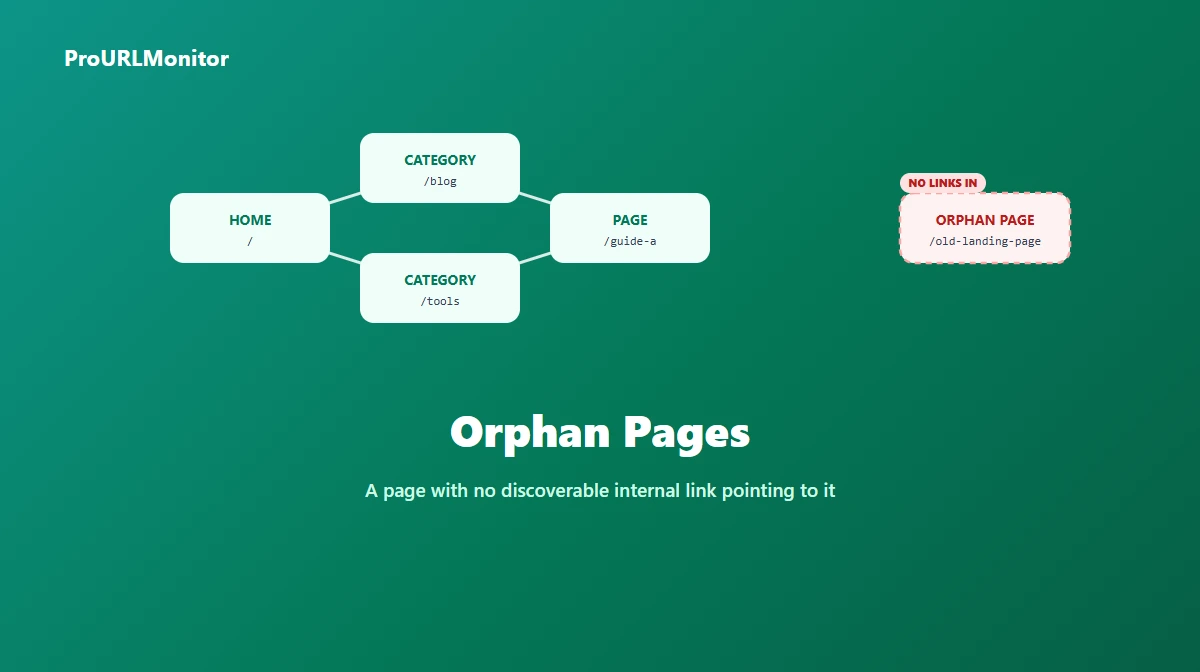
An orphan page is a page that exists on your site but has no discoverable internal link pointing to it from any other crawlable page on your site. It might still have a working URL. It might even be listed in your sitemap or show up in Google's index from an old backlink. What it doesn't have is a path — a click-through route starting from your homepage, navigation, or any other page's content — that leads a visitor or a crawler to it.
That last part is the precise definition, and it matters because people often use "orphan page" loosely to mean "a page that doesn't get much traffic" or "a page I forgot about." Neither of those is quite right. A page can get plenty of direct traffic (from an email campaign, a QR code, a paid ad) and still be a true orphan in the internal-linking sense, because none of that traffic came from — or reveals — an internal link.
Why Orphan Pages Happen
Orphan pages aren't usually the result of one big mistake — they accumulate from a handful of common, ordinary situations:
- A page was published without adding it anywhere else. This is the most common cause: a new post or landing page goes live, but no existing page gets updated to link to it.
- A site redesign changed the navigation and an old page's only link path (a menu item, a category listing) was removed without anyone checking what depended on it.
- A category or tag was deleted or renamed, silently cutting off every page that was only reachable through that category page.
- Old campaign or seasonal pages were built to be findable only through a specific external link (an ad, an email), and internal linking was never part of the plan.
- A migration or platform change dropped internal links that existed in the old system but weren't recreated in the new one.
Why Orphan Pages Hurt SEO
Three related but distinct effects, worth separating instead of lumping together as "bad for SEO":
Discovery and crawling. Search engines primarily find pages by following links (and by sitemaps, discussed below). A page with no internal link path is harder to discover in the first place, and once discovered, it's less likely to be recrawled on a regular basis — crawlers tend to revisit well-linked pages more often than isolated ones.
Link equity. Internal links distribute authority across a site's pages. A page with zero incoming internal links receives essentially none of that distributed signal, which puts it at a real disadvantage compared to an identical page that does get linked from relevant, well-connected pages.
User experience. This is the most direct effect and the easiest to verify yourself: if a real visitor reading your site has no way to click through to a page, that page is only ever reached by people who already had its exact URL. For most content, that's a small fraction of its potential audience.
Orphan Pages vs. Weakly-Linked Pages
These get conflated, but they're different problems with different fixes.
A true orphan page has zero internal links pointing to it. It needs at least one relevant, crawlable link from somewhere on the site — the starting point is getting it into the link graph at all.
A weakly-linked page has some internal links, just not enough — or not from pages relevant or prominent enough to matter. This page doesn't need to be "discovered" the same way; it needs better placement, more relevant surrounding context, or links from higher-traffic pages.
Treating a weakly-linked page like an orphan (by, say, adding a single low-quality link and calling it fixed) misses the actual problem. Treating a true orphan like it just needs "better" links misses that it currently has none at all.
Sitemap-Only Pages: A Special Case
It's worth being explicit about a case that trips people up: a page listed in your sitemap.xml but linked from nowhere else on the site.
A sitemap is a separate discovery channel — it can help a search engine find and crawl a URL even without a link pointing to it. But a sitemap entry does not create an internal link. It gives the page no link equity, and it gives a human visitor no way to browse to it. Depending on which methodology you use, this kind of page might not show up as a "true" orphan in a strict crawl-based check (since a sitemap-driven crawler will still discover it), but for the linking half of the problem — equity, contextual relevance, discoverability through normal browsing — it behaves exactly like an orphan. Worth checking both ways rather than assuming a sitemap listing is sufficient.
How to Find Orphan Pages
Finding orphan pages reliably requires comparing two different views of your site, because neither one alone tells you the full story:
- Every URL your site can produce. This usually comes from your CMS/database export, your full sitemap (including nested sitemap indexes), or your own inventory of published pages.
- Every URL that's actually reachable by following links. This requires a crawler that starts at your homepage and navigation and follows every internal link it finds, building a map of what links to what — the same way a search engine crawler would.
Any URL that shows up in the first list but never appears as a link target anywhere in the second is an orphan page. This comparison is inherently a sitewide, crawl-based exercise — there's no way to answer "does anything on my entire site link to this one page?" by looking at a single page's content, since the answer could be hiding on any of your other pages.
A third, complementary signal worth cross-checking: Google Search Console's coverage/indexing report. If Google has a page indexed but your own crawl never found a link to it from anywhere on your site, that combination is a strong orphan signal — Google likely found it through a sitemap or an old backlink rather than your current internal linking.
A practical starting workflow:
- Export your full page inventory (CMS export or sitemap).
- Run a full-site crawl with a tool built for that purpose, and export its internal link graph.
- Cross-reference the two lists — pages in your inventory that never appear as a crawl-discovered link target are your orphan candidates.
- Spot-check candidates against Search Console's coverage report to see whether Google found them anyway (via sitemap or backlink), which changes the fix but doesn't change the orphan status.
When an Orphan Page Might Be Intentional
Not every unlinked page is a mistake. Some are orphaned on purpose, and treating every orphan as a bug to squash can do more harm than good:
- Paid landing pages built for a specific ad campaign, deliberately excluded from navigation so organic visitors don't land on an offer meant only for paid traffic.
- Thank-you or confirmation pages that only make sense as the destination of a specific action (form submission, purchase) — linking them from navigation would be actively confusing.
- Pages intentionally set to
noindexfor legal, duplicate-content, or internal-tooling reasons, where discoverability was never the goal. - Time-limited or archived content a site owner deliberately stopped surfacing without deleting outright.
Before "fixing" an orphan page by linking it from somewhere, check whether it was orphaned on purpose.
Avoiding False Positives
A few things that look like orphan signals but aren't reliable on their own:
- Zero organic traffic doesn't mean zero internal links — the page might be linked but simply not ranking or not compelling enough to earn clicks.
- Not appearing in your navigation menu doesn't mean it's unlinked — plenty of legitimately well-linked pages (deep blog posts, individual product pages) are reached through contextual or category links, not the main menu.
- A low pageview count is a traffic problem, not necessarily a linking problem — verify the actual link graph before assuming the cause.
The only reliable check is the actual comparison described above: does any crawlable page on the site link to this URL, yes or no.
How to Fix an Orphan Page
Once you've confirmed a page is a genuine, unintentional orphan:
- Find genuinely relevant existing pages that could reasonably link to it — don't just pick the highest-traffic page on the site if the topic doesn't fit.
- Add a contextual link from those pages, with anchor text that describes what the orphan page actually offers. If you're editing one of those pages and want help finding the right passage and anchor idea, the Internal Linking Assistant can compare that page's content against the orphan URL and suggest where a link would fit — though it works one page at a time on URLs you already know about, not as a way to discover which pages are orphaned in the first place.
- Consider whether it belongs in navigation or a category listing, not just a one-off contextual link, if it's an important enough page.
- Re-crawl and re-check after making changes to confirm the page is now part of your site's actual link graph, not just linked from one place you forgot to verify.
For the broader picture — anchor text, site hierarchy, and how internal linking fits together as a strategy — see our full guide to internal linking for SEO.
Frequently Asked Questions
What is an orphan page?
An orphan page is a page that exists on your website but has no discoverable internal link pointing to it from any other crawlable page on the site. It might still be reachable by a direct URL, listed in a sitemap, or indexed from an old backlink, but nothing on your own site currently links to it — which makes it hard for both visitors and search engine crawlers to find through normal navigation.
Are orphan pages bad for SEO?
Generally, yes, for the pages you actually want found. An orphan page is harder to discover, harder to crawl on a recurring basis, and receives no internal link equity from the rest of the site, all of which make it harder for that page to compete for rankings even if it does eventually get indexed. That said, not every unlinked page is a problem — some are intentionally kept out of normal navigation.
Is a page in my sitemap still an orphan page?
Often, yes. A sitemap is a separate discovery channel from your site's own internal links — listing a URL in sitemap.xml can help a search engine find and crawl it, but it does nothing to give that page internal link equity, and it doesn't help a human visitor find the page through normal browsing. A page that exists only in a sitemap, with zero internal links pointing to it, is still functionally an orphan for linking purposes, even though it may still get crawled and indexed.
What's the difference between an orphan page and a page with weak internal linking?
An orphan page has zero discoverable internal links pointing to it — none. A weakly-linked page has at least one, but far fewer than its importance would justify, or the links it does have come from low-relevance or low-traffic pages. Both are worth fixing, but they're different problems: an orphan page needs to be linked from somewhere at all, while a weakly-linked page usually needs better-placed, more relevant links rather than its first one.
How do I find orphan pages on my site?
Compare two lists: every URL your site can produce (from a full crawl, your CMS/database, or your sitemap) against every URL that's actually reachable by following links starting from your homepage and navigation (from a crawler's link graph). Any URL that appears in the first list but never turns up as a link target in the second is an orphan. Cross-checking against Google Search Console's coverage report is a useful third signal — pages Google has indexed that don't show up as linked from anywhere in your own crawl are a strong orphan signal.
Can the Internal Linking Assistant find orphan pages for me?
No, and it doesn't claim to. The Internal Linking Assistant compares one page's pasted content against destination URLs you already supply — it never crawls your site or builds a sitewide link graph, so it has no way to know whether a page has zero internal links pointing to it anywhere on your site. Use it after you've identified relevant pages and want contextual linking ideas between them, not as a way to discover which pages are orphaned in the first place.
Try Our Free SEO Tools
Put what you learned into action with our free SEO analysis tools.