Binary Subtraction Explained: Rules, Borrowing & Worked Examples
Binary subtraction follows the same positional idea as decimal subtraction, but it uses only the digits 0 and 1. Three of the four basic combinations are exactly what you'd expect: 0 - 0 = 0, 1 - 0 = 1, and 1 - 1 = 0. The one that trips people up is 0 - 1, which can't be done directly — you have to borrow from the next binary place, turning the current column into 10₂ (decimal 2) before subtracting: 10₂ - 1₂ = 1₂.
This guide covers the four subtraction rules, how borrowing works — including the tricky case of borrowing across several zeros — and six worked examples verified column by column.
What Is Binary Subtraction?
Binary subtraction is arithmetic in base 2, where every number is written using only the digits 0 and 1. Each position represents a power of 2 — 1, 2, 4, 8, 16, and so on — the same positional-notation idea decimal uses with powers of 10 instead.
Like decimal subtraction, it proceeds one column at a time, starting from the rightmost (least significant) digit and moving left. When the top bit in a column is smaller than the bottom bit, the column borrows from the column to its left. For more on why computers represent values this way, see why computers use binary.
Binary Subtraction Rules
There are four combinations to know for subtracting one bit from another:
| Operation | Result |
|---|---|
| 0 - 0 | 0 |
| 1 - 0 | 1 |
| 1 - 1 | 0 |
| 0 - 1 | borrow required |
The first three behave exactly like decimal. The fourth is where binary subtraction needs an extra step: 0 - 1 can't produce a valid single-bit result on its own, so the column borrows 1 from the next higher place. Once borrowed, the current column has 10₂ (decimal 2) instead of 0, and:
10₂ - 1₂ = 1₂
Borrowing also reduces the column that lent the 1 by exactly 1, which is what can trigger the column-to-column cascading covered later in this article.
How to Subtract Binary Numbers
The method is a direct extension of the rules above, applied column by column:
- Align the two binary numbers by their rightmost (least significant) bit.
- Start at the rightmost column.
- If the top bit is greater than or equal to the bottom bit, subtract directly.
- If the top bit is smaller than the bottom bit (a 0 - 1 case), borrow 1 from the next column to the left. The current column becomes 10₂, then subtract.
- Move one column left and repeat, accounting for any borrow already taken from that column.
- Once finished, unnecessary leading zeros can be dropped from an ordinary (non-fixed-width) result.
Step 4 is the one worth slowing down on, since a borrow can require reaching further left than just one column — that case is covered in its own section below.
How Borrowing Works in Binary
In decimal subtraction, borrowing 1 from the next column adds 10 units of the current place, because each decimal place is worth 10 times the one to its right. Binary works the same way, just scaled by 2 instead of 10: borrowing 1 from the next binary place adds 10₂ units — decimal 2 — of the current place, because each binary place is worth twice the one to its right.
10₂ - 1₂ = 1₂
Here, 10₂ is not "the text ten." It's the binary digits 1 and 0, which together represent the value decimal 2. Reading a borrowed column as "borrowed 1 becomes 2" only makes sense once you know that 10 in base 2 means two, the same way 10 in base 10 means ten.
Binary Subtraction Examples
Each example below is verified column by column, from a single borrow to a fully cascading one.
Example 1: 101₂ - 10₂
     0
    1 0 1
  -   1 0
  -------
    0 1 1
- Column 1 (rightmost): 1 - 0 = 1
- Column 2: 0 - 1 → borrow from column 3. The column becomes 10₂, so 2 - 1 = 1
- Column 3 (leftmost): after lending its 1, this column is 1 - 1 = 0
Result: 11₂. Decimal check: 5 - 2 = 3, and 11₂ = 3. Correct.
Example 2: 1010₂ - 11₂ (with cascading borrows)
  0 1 1        (borrows)
    1 0 1 0
  -     1 1
  ---------
    0 1 1 1
- Column 1 (rightmost): 0 - 1 → borrow. Column becomes 10₂, so 2 - 1 = 1
- Column 2: 1 - 1 (borrowed) - 1 = -1 → borrow again. Column becomes 10₂ + 1 = 11₂ (3), so 3 - 1 = 1
- Column 3: 0 - 0 - 1 (borrowed) = -1 → borrow. Column becomes 10₂, so 2 - 0 - 1 = 1
- Column 4 (leftmost): after lending its 1, this column is 1 - 0 - 1 = 0
Result: 111₂. Decimal check: 10 - 3 = 7, and 111₂ = 7. Correct.
Example 3: 1101₂ - 101₂
    1 1 0 1
  -   1 0 1
  ---------
    1 0 0 0
Every column subtracts cleanly with no borrowing needed. Result: 1000₂. Decimal check: 13 - 5 = 8, and 1000₂ = 8. Correct.
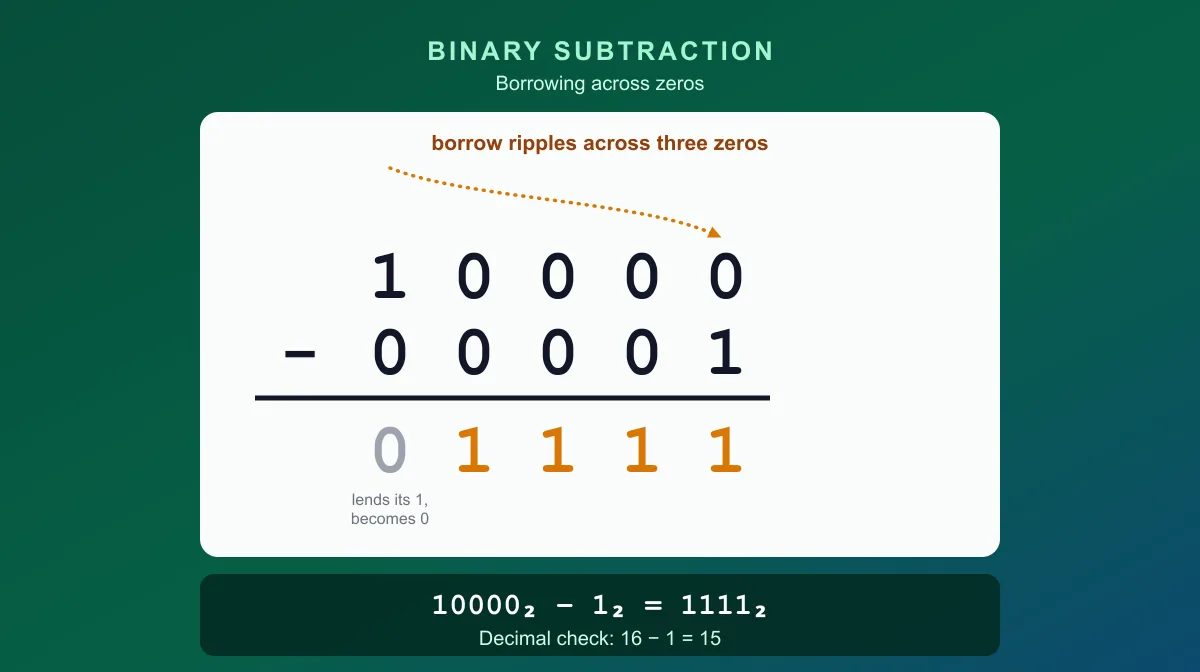
Example 4: 10000₂ - 1₂ (borrowing across zeros)
    1 0 0 0 0
  -         1
  -----------
    0 1 1 1 1
This is the multi-zero borrow case, walked through in full detail in the next section. Result: 1111₂. Decimal check: 16 - 1 = 15, and 1111₂ = 15. Correct.
Example 5: 10110₂ - 1101₂
    1 0 1 1 0
  -   1 1 0 1
  -----------
    0 1 0 0 1
- Column 1 (rightmost): 0 - 1 → borrow. Column becomes 10₂, so 2 - 1 = 1
- Column 2: 1 - 0 (borrowed) = 0
- Column 3: 1 - 1 = 0
- Column 4: 0 - 1 → borrow. Column becomes 10₂, so 2 - 1 = 1
- Column 5 (leftmost): after lending its 1, this column is 1 - 0 - 1 = 0
Result: 1001₂. Decimal check: 22 - 13 = 9, and 1001₂ = 9. Correct.
Example 6: 110100₂ - 10111₂ (borrow through nearly every column)
0 1 1 1 1        (borrows)
  1 1 0 1 0 0
-   1 0 1 1 1
-------------
  0 1 1 1 0 1
- Column 1 (rightmost): 0 - 1 → borrow. Column becomes 10₂, so 2 - 1 = 1
- Column 2: 0 - 1 (borrowed) - 1 = -2 → borrow. Column becomes 10₂, so 2 - 1 - 1 = 0
- Column 3: 1 - 1 (borrowed) - 1 = -1 → borrow. Column becomes 11₂ (3), so 3 - 1 - 1 = 1
- Column 4: 0 - 0 - 1 (borrowed) = -1 → borrow. Column becomes 10₂, so 2 - 0 - 1 = 1
- Column 5: 1 - 1 - 1 (borrowed) = -1 → borrow. Column becomes 11₂ (3), so 3 - 1 - 1 = 1
- Column 6 (leftmost): after lending its 1, this column is 1 - 0 - 1 = 0
Result: 11101₂. Decimal check: 52 - 23 = 29, and 11101₂ = 29. Correct.
How to Check a Binary Subtraction Result
Binary subtraction can be verified by converting both operands to decimal, subtracting them normally, and converting the difference back to binary:
10110₂ = 22
1101₂  = 13
22 - 13 = 9
9 in decimal = 1001₂
This matches Example 5 above. Converting by hand is straightforward with the Binary to Decimal Converter — this is a way to double-check an answer, not a substitute for knowing the column-by-column method.
Borrowing Across Multiple Zeros
Example 4, 10000₂ - 1₂, is worth a dedicated walkthrough because it's the case most learners find confusing: the rightmost column needs to borrow, but every column to its left is 0 — except the very last one — so there's nothing nearby to borrow from.
The resolution is the same idea decimal subtraction uses when borrowing through zeros (think of 1000 - 1 = 999 in decimal): the borrow ripples left until it reaches a column that actually has something to lend.
  1 0 0 0 0
-         1
- Column 1 needs to borrow, but column 2 is 0 and has nothing to lend.
- Column 2 must therefore borrow from column 3 first — but column 3 is also 0.
- Column 3 must borrow from column 4 — also 0.
- Column 4 borrows from column 5, which is 1. Column 5 can finally lend: it gives up its 1 and becomes 0.
- That borrowed 1 arrives at column 4 as 10₂ (2). Column 4 needs to pass 1 of it along to column 3, so it keeps 2 - 1 = 1.
- Column 3 receives that borrow as 10₂ (2), passes 1 along to column 2, and keeps 2 - 1 = 1.
- Column 2 receives its borrow as 10₂ (2), passes 1 along to column 1, and keeps 2 - 1 = 1.
- Column 1 finally receives its borrow as 10₂ (2), and subtracts: 2 - 1 = 1.
Every zero the borrow passed through ends up as 1 (after handing 1 further along), and the leading 1 that originally lent the value ends up as 0. Reading the result from column 5 down to column 1: 01111, which is 1111₂.
Cross-check: 10000₂ = 16, 1₂ = 1, and 16 - 1 = 15. 15 in decimal is 1111₂ — matching the result above.
What Happens When the Second Number Is Larger?
Every example so far has a first operand larger than the second. When the second unsigned binary number is bigger — for example, 11₂ (3) minus 101₂ (5) — the mathematical result is negative, and ordinary unsigned binary subtraction has no bit pattern that represents it.
It's tempting to just write a minus sign in front of a binary string, like "-10", and treat that as the answer. That's readable to a person, but it isn't a standard fixed-width binary encoding — there's no bit position reserved for a sign in plain unsigned binary. This is exactly why the Binary Calculator reports a negative subtraction result in decimal instead of guessing at an invalid binary string.
Representing a genuinely negative value in binary requires a defined signed convention, which is the subject of the next section.
Signed Binary Subtraction
Signed binary numbers — values that can be positive, negative, or zero — are almost always represented using two's complement rather than a plain minus sign. See Two's Complement Explained for the full method of converting between signed and unsigned values; the Two's Complement Calculator handles the conversion directly.
Conceptually, signed subtraction is performed as addition of a negative value:
A - B is computed as A + (-B)
within a chosen bit width, where -B is B's two's complement. For example, in 8-bit two's complement, 3 - 5 is computed as 3 + (-5):
   3:  00000011
  -5:  11111011
  -------------
 sum:  11111110
The sum, 11111110, has a leading 1, so it's negative. Decoding it (invert the bits, add 1) gives magnitude 00000010 = 2, so the value is -2 — matching 3 - 5 = -2. Working out the invert-and-add-one encoding itself is covered in the two's complement article; the point here is just that subtraction, at the bit level, is really addition once one operand's sign is flipped. This is a large enough topic to deserve its own dedicated coverage — this article's examples are all unsigned.
Binary Subtraction vs Decimal Subtraction
The two systems follow the identical underlying process — align by place value, subtract column by column from the right, borrow when a column can't subtract directly. They only differ in how much a borrow is worth:
| Decimal | Binary | |
|---|---|---|
| Base | 10 | 2 |
| Digits available | 0–9 | 0, 1 |
| A borrow is worth | 10 units of the current place | 2 units of the current place, written 10₂ |
| Example | 12 - 5 = 7 | 1100₂ - 101₂ = 111₂ |
Anyone comfortable with decimal subtraction already understands binary subtraction conceptually — the only new habit is that a borrow arrives one step sooner, and it's worth 2 instead of 10.
Binary Addition vs Subtraction
Addition and subtraction are mirror-image operations that use opposite mechanics: addition carries a value into the next column to the left when a column's total is too big; subtraction borrows a value from the next column to the left when a column's top bit is too small. See Binary Addition Explained for the carrying rules in detail.
How Computers Perform Subtraction
At a conceptual level, digital systems commonly avoid building a separate subtraction circuit at all. Because signed values are represented in two's complement, A - B can be computed as A + (-B), reusing the same adder hardware that performs addition — negating the second operand is enough to turn subtraction into addition. This is a high-level description of a common design choice, not a claim that every architecture implements arithmetic identically.
Fixed-Width Subtraction and Underflow
Every worked example above assumes ordinary, unrestricted binary integers. Systems that store values in a fixed width — 8 bits, 16 bits, and so on — can behave differently when a subtraction's true mathematical result doesn't fit. Take unsigned 8-bit 0 - 1:
Mathematical result: -1
An unsigned 8-bit value has no way to store -1. In modular 8-bit arithmetic, the operation instead wraps around to:
11111111 (interpreted as unsigned: 255)
This wraparound is a property of fixed-width modular arithmetic, not the actual mathematical result of 0 - 1. Treating 255 as if it were the "answer" to 0 - 1 confuses two different things: the true integer result and how a specific fixed-width storage format represents an out-of-range value.
Common Mistakes
- Forgetting to borrow. A 0 - 1 column can't be resolved without borrowing from a higher column — skipping it produces a wrong digit.
- Treating 10₂ as decimal ten. In a borrowed column, 10₂ means decimal 2, not ten. The digits alone don't indicate the base; context does.
- Borrowing only one column when it must propagate. When every intervening column is 0, the borrow has to ripple further left until it finds a column with something to lend — see the multi-zero example above.
- Misaligning place values. Numbers of different lengths need to be aligned by their rightmost bit, not their leftmost one.
- Skipping the decimal cross-check. Converting both operands to decimal and comparing is a fast way to catch a dropped borrow before it becomes a bigger mistake downstream.
- Assuming a negative result can be written with a minus sign as a fixed-width binary value. A string like "-101" isn't a valid unsigned binary encoding — signed values need a defined convention like two's complement.
- Mixing signed and unsigned interpretation. The same bit pattern can mean different things depending on whether it's read as unsigned magnitude or as signed two's complement.
Quick Reference Table
| Binary operation | Result | Action |
|---|---|---|
| 0 - 0 | 0 | write 0 |
| 1 - 0 | 1 | write 1 |
| 1 - 1 | 0 | write 0 |
| 10₂ - 1₂ (after borrowing) | 1₂ | write 1 |
For longer values, or to skip the manual borrowing entirely, the Binary Calculator computes exact binary and decimal subtraction results for numbers of any length.
Frequently Asked Questions
What are the rules of binary subtraction?
There are four combinations: 0 - 0 = 0, 1 - 0 = 1, 1 - 1 = 0, and 0 - 1 requires borrowing from the next higher binary place. Once you borrow, the current column effectively becomes 10₂ (decimal 2), so 10₂ - 1₂ = 1₂.
How do you subtract binary numbers?
Align the two numbers by their rightmost bit, then subtract column by column from right to left. If the top bit is greater than or equal to the bottom bit, subtract directly. If the top bit is smaller (a 0 - 1 case), borrow 1 from the next column to the left, which makes the current column 10₂ before subtracting.
What happens when you subtract 1 from 0 in binary?
You can't subtract 1 from 0 directly, so you borrow from the next binary place to the left. That borrow adds 10₂ (decimal 2) to the current column, giving 10₂ - 1₂ = 1₂, and it reduces the column you borrowed from by 1.
How does borrowing work in binary subtraction?
Borrowing moves a value of 1 from a higher binary place into the current column. Because each place is worth twice the one to its right, that borrowed 1 is worth 10₂, or decimal 2, once it lands in the current column — not decimal 10, the way a borrow works in base 10.
What is 10000 minus 1 in binary?
10000₂ - 1₂ = 1111₂. The rightmost column needs to borrow, but every column to its left is 0 until the leading 1, so the borrow ripples across all three zeros: each one becomes 1 after lending onward, and the leading 1 becomes 0. In decimal, this is 16 - 1 = 15, and 15 = 1111₂.
How can I check a binary subtraction answer?
Convert both binary numbers to decimal, subtract them the normal way, then convert that decimal difference back to binary and compare it to your binary result. For example, 10110₂ = 22 and 1101₂ = 13; 22 - 13 = 9, and 9 = 1001₂, which matches subtracting the two binary numbers directly.
What happens if the second binary number is larger?
The mathematical result is negative, and ordinary unsigned binary has no way to write that. Writing a minus sign in front of a bit pattern (like "-101") isn't a real fixed-width binary representation. Signed binary values that can be negative are represented using a defined convention, most commonly two's complement.
How is signed binary subtraction handled?
Signed subtraction is commonly performed as addition of a negative value: A - B becomes A + (-B) within a fixed bit width, where -B is B's two's complement. This lets the same addition circuitry handle both addition and subtraction. See Two's Complement Explained for how that negative representation is built.
Try Our Free SEO Tools
Put what you learned into action with our free SEO analysis tools.