Binary Addition Explained: Rules, Carrying & Worked Examples
Binary addition works like decimal addition, but it uses only two digits instead of ten. Three of the four basic combinations are exactly what you'd expect: 0 + 0 = 0, 0 + 1 = 1, and 1 + 0 = 1. The one that trips people up is 1 + 1, which produces 10 in binary — not "2," since binary has no digit for two. That result means write 0 in the current column and carry 1 into the next one, the same carrying mechanic decimal addition uses when a column reaches 10.
This guide covers the four addition rules, how carrying works across multiple digits, and several worked examples verified digit by digit, from simple single-bit sums to multi-digit numbers with cascading carries.
What Is Binary Addition?
Binary addition is arithmetic in base 2, where every number is written using only the digits 0 and 1. Each position represents a power of 2 — 1, 2, 4, 8, 16, and so on — the same positional-notation idea decimal uses with powers of 10 instead.
Like decimal addition, it proceeds one column at a time, starting from the rightmost (least significant) digit and moving left. When a column's total is too large to fit in a single digit, the extra amount carries into the next column. The only real difference from decimal is when that carry happens: decimal carries at a column total of 10, binary carries at 2. For more on why computers represent values this way, see why computers use binary.
Binary Addition Rules
There are four combinations to know for adding two single bits:
0 + 0 = 0
0 + 1 = 1
1 + 0 = 1
1 + 1 = 10
The first three behave exactly like decimal. The fourth is where binary's two-digit limit shows up: 1 + 1 has the value decimal 2, but binary has no single digit for "2" — the smallest way to write it is 10. So 1 + 1 = 10 means write 0 in this column, carry 1 into the next.
Once you're adding numbers with more than one digit, a fifth case appears: a column with two 1s plus a carry coming in from the column to its right.
1 + 1 + 1 = 11
Here the total is decimal 3, written 11 in binary — write 1, carry 1. This is the case that appears in every middle column of a multi-digit sum once carries start stacking up.
How to Add Binary Numbers
The method is a direct extension of the rules above, applied column by column:
- Align the two binary numbers by their rightmost (least significant) bit.
- Start at the rightmost column.
- Add the two bits in that column, plus any carry from the column to its right.
- Write down the result bit for that column.
- If the column's total is 2 or 3, carry 1 into the next column to the left.
- Move one column left and repeat.
- After the leftmost column, if a carry remains, write it as a new leading bit.
That last step is easy to forget, and it's the difference between a correct result and one that's short a digit — more on that below.
Binary Addition with Carry
Every column addition boils down to one of four possible totals, and each total has a fixed write-and-carry outcome:
| Column total | Binary | Write | Carry |
|---|---|---|---|
| 0 | 0 | 0 | 0 |
| 1 | 1 | 1 | 0 |
| 2 | 10 | 0 | 1 |
| 3 | 11 | 1 | 1 |
A column can only ever total 0, 1, 2, or 3, because it's adding at most two bits (0 or 1 each) plus at most one incoming carry (0 or 1). Once you recognize which of these four totals a column has, the write and carry values follow automatically — there's no need to memorize separate cases for two-bit versus three-value additions.
Binary Addition Examples
These examples move from a simple two-digit sum to a longer one with several cascading carries. Every result below is verified.
Example 1: 101₂ + 11₂
  101
+  11
-----
 1000
Decimal check: 5 + 3 = 8, and 1000₂ = 8. Correct.
Example 2: 1010₂ + 1100₂
  1010
+ 1100
------
 10110
Decimal check: 10 + 12 = 22, and 10110₂ = 22. Correct.
Example 3: 1111₂ + 1₂
  1111
+    1
------
 10000
Decimal check: 15 + 1 = 16, and 10000₂ = 16. Correct.
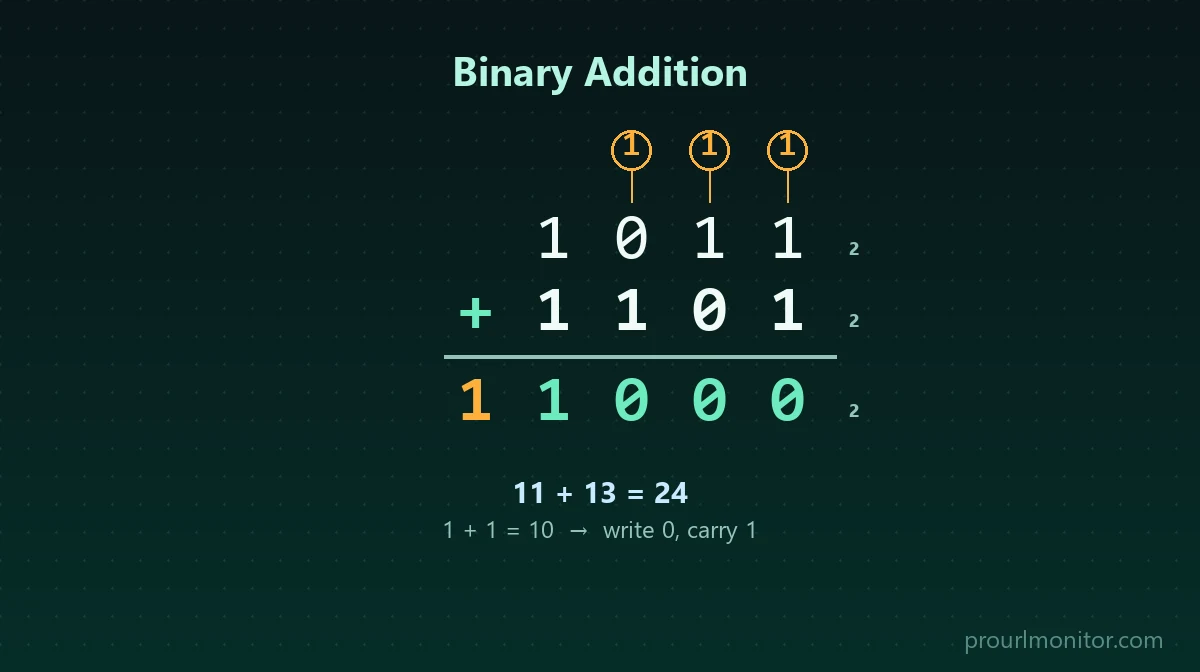
Example 4: 1011₂ + 1101₂ (with carries shown)
This one has a carry in every column, so it's worth walking through right to left:
     1 1 1     (carries)
     1 0 1 1
   + 1 1 0 1
   ---------
   1 1 0 0 0
- Column 1 (rightmost): 1 + 1 = 10 → write 0, carry 1
- Column 2: 1 + 0 + carry 1 = 10 → write 0, carry 1
- Column 3: 0 + 1 + carry 1 = 10 → write 0, carry 1
- Column 4 (leftmost): 1 + 1 + carry 1 = 11 → write 1, carry 1
- The final carry has nowhere left to go, so it becomes a new leading bit.
Reading the leading carry followed by each column's result gives 11000₂. Decimal check: 11 + 13 = 24, and 11000₂ = 24. Correct.
Example 5: 11101₂ + 10111₂
  11101
+ 10111
-------
 110100
Decimal check: 29 + 23 = 52, and 110100₂ = 52. Correct.
How to Check a Binary Addition Result
Binary addition can be verified by converting both operands to decimal, adding them normally, and converting the sum back to binary:
1010₂ = 10
1100₂ = 12
10 + 12 = 22
22 in decimal = 10110₂
This matches Example 2 above. Converting by hand is straightforward with the Binary to Decimal Converter and Decimal to Binary Converter — this is a way to double-check an answer, not a substitute for knowing the column-by-column method.
Why Does 1 + 1 Equal 10 in Binary?
Decimal runs out of digits after 9, so the very next value has to roll over into a new column: 10. Binary hits that same wall one step earlier, because it only has two digits, 0 and 1. The next value after 1 is 10.
So 1₂ + 1₂ = 10₂ isn't a special exception to normal math — it's the same rollover behavior decimal uses, just triggered sooner because binary has fewer symbols per position. 1 + 1 has the value decimal 2; that value is simply written as 10 once you're in base 2.
What Happens When the Result Needs an Extra Bit?
Adding two numbers of the same length can produce a result one digit longer, as in Example 3: 1111₂ + 1₂ = 10000₂. The leftover carry from the final column becomes a new most-significant bit. For ordinary binary arithmetic on unrestricted integers, that's completely normal — there's no upper limit on how many bits a result can have.
It's a different story once a system stores results in a fixed width — 8 bits, 16 bits, 32 bits, and so on:
  11111111
+        1
----------
 100000000
Mathematically, 255 + 1 = 256, and 100000000₂ = 256 — nine bits. But an 8-bit storage location only has room for eight, so the ninth bit, the carry out of the top column, doesn't fit and is lost. This is fixed-width behavior, not a flaw in the addition itself — the arithmetic is correct, but the container is too small to hold the full answer. Systems and languages handle that lost bit differently: some flag it as overflow, others simply discard it.
Signed Binary and Two's Complement
Every example in this article uses unsigned binary — every bit contributes to the number's magnitude, and there's no way to represent a negative value. That covers the great majority of everyday binary addition.
Signed binary numbers, which can be negative, are typically stored using two's complement instead. The bit-level addition process is closely related to what's shown above, but interpreting the result — and detecting overflow — depends on signed-width rules that don't apply to unsigned arithmetic. That's a large enough topic to deserve its own treatment; see Two's Complement Explained for how signed binary numbers are represented, and the Two's Complement Calculator for converting between signed and unsigned values.
Binary Addition vs Decimal Addition
The two systems follow the identical underlying process — align by place value, add column by column from the right, carry when a column overflows its digit set. They only differ in where that overflow threshold sits:
| Decimal | Binary | |
|---|---|---|
| Base | 10 | 2 |
| Digits available | 0–9 | 0, 1 |
| Carry triggers at column total of | 10 | 2 |
| Example | 7 + 5 = 12 | 111₂ + 101₂ = 1100₂ |
Anyone comfortable with decimal addition already understands binary addition conceptually — the only new habit is carrying one step sooner. For more on how the two systems compare beyond arithmetic, see Binary vs Decimal.
Subtraction is addition's mirror image: instead of carrying a value into the next column when a total is too big, it borrows a value from the next column when the top bit is too small. See Binary Subtraction Explained for the borrowing rules and worked examples.
The same column-and-carry method applies in other bases, just with a different carry threshold. See Hex Addition for how it works in base 16, where a column carries at decimal 16 instead of 2.
How Computers Add Binary Numbers
At a conceptual level, digital circuits perform binary addition using components built from logic gates. A half adder takes two input bits and produces a sum bit and a carry-out bit — enough for a single column with no incoming carry. A full adder extends that by also accepting a carry-in, needed for every column except the first. Chaining full adders together, one per bit position, lets a circuit add binary numbers of any width, each adder's carry-out feeding the next adder's carry-in — the same right-to-left, carry-forward structure used throughout this article.
Every possible input combination for a full adder, verified for all eight cases:
| A | B | Carry In | Sum | Carry Out |
|---|---|---|---|---|
| 0 | 0 | 0 | 0 | 0 |
| 0 | 0 | 1 | 1 | 0 |
| 0 | 1 | 0 | 1 | 0 |
| 0 | 1 | 1 | 0 | 1 |
| 1 | 0 | 0 | 1 | 0 |
| 1 | 0 | 1 | 0 | 1 |
| 1 | 1 | 0 | 0 | 1 |
| 1 | 1 | 1 | 1 | 1 |
This table is the full-adder equivalent of the column-total table earlier in this article — same four possible totals (0, 1, 2, 3), just laid out per input combination instead of per sum. For a deeper look at the AND/OR/XOR logic these circuits are built from, see Bitwise Operations.
Common Mistakes in Binary Addition
- Forgetting a carry. Once a column produces a carry, it has to be added into the next column — skipping it is the most common source of wrong answers.
- Reading "10" as ten. In a binary result, 10 means decimal 2, not decimal ten. The digits alone don't tell you the base; context does.
- Working left to right. Binary addition, like decimal addition, has to start from the rightmost column, since carries only ever flow from right to left.
- Misaligning place values. Numbers of different lengths need to be aligned by their rightmost bit, not their leftmost one.
- Dropping the final carry. If a carry remains after the leftmost column, it becomes a new leading bit — leaving it off produces a result that's one digit short and mathematically wrong.
- Confusing unrestricted addition with fixed-width overflow. Getting an extra bit is normal for plain binary arithmetic; it only becomes an overflow condition inside a system that stores results in a fixed number of bits.
- Mixing signed and unsigned interpretations. The same bit pattern can mean different things depending on whether it's read as unsigned or as signed two's complement — the addition steps shown here assume unsigned values.
Quick Reference Table
| Binary operation | Result | Action |
|---|---|---|
| 0 + 0 | 0 | write 0 |
| 0 + 1 | 1 | write 1 |
| 1 + 0 | 1 | write 1 |
| 1 + 1 | 10 | write 0, carry 1 |
| 1 + 1 + 1 | 11 | write 1, carry 1 |
For longer values, or to skip the manual carrying entirely, the Binary Calculator computes exact binary, decimal, and hexadecimal results for numbers of any length.
Frequently Asked Questions
What are the four rules of binary addition?
0 + 0 = 0, 0 + 1 = 1, 1 + 0 = 1, and 1 + 1 = 10 (write 0, carry 1). A fifth situation comes up once you're adding multi-digit numbers: 1 + 1 + 1 = 11 (write 1, carry 1), which happens whenever a column already has an incoming carry.
How do you add binary numbers?
Align the numbers by their rightmost bit, then add column by column from right to left, just like decimal addition. Add the two bits in a column plus any carry from the previous column, write down the result bit, and carry 1 whenever the column total is 2 or 3. If a carry remains after the leftmost column, write it as a new leading bit.
Why is 1 + 1 equal to 10 in binary?
Binary only has two digits, 0 and 1, so it runs out of symbols after 1 the same way decimal runs out after 9. Just as decimal rolls over from 9 to 10, binary rolls over from 1 to 10. 1 + 1 has the value decimal 2, and 2 is written 10 in base 2 — write 0 in the current column, carry 1 to the next.
What is a carry in binary addition?
A carry is the extra 1 moved into the next column to the left when a column's total reaches 2 or 3, since a single binary digit can only hold 0 or 1. It works exactly like carrying in decimal addition, except in binary a carry is triggered at 2 instead of 10.
What is 1 + 1 + 1 in binary?
1 + 1 + 1 equals 11 in binary: write 1 in the current column and carry 1 to the next. This case shows up whenever a column has two 1s plus an incoming carry of 1 from the previous column.
How can I check a binary addition answer?
Convert both original numbers to decimal, add them the normal way, then convert that decimal sum back to binary and compare it to your binary result. If all three numbers agree, the binary addition was done correctly. For quick checks, use a Binary to Decimal Converter and Decimal to Binary Converter, or verify the whole operation directly with the Binary Calculator.
What happens if binary addition produces an extra bit?
When the leftmost column still has a carry left over after adding, that carry becomes a new most-significant bit, making the result one digit longer than either operand — for example, 1111 + 1 = 10000. For ordinary binary arithmetic on unrestricted integers, this is completely normal. It only becomes "overflow" when a system stores the result in a fixed number of bits and that extra bit has nowhere to go.
Is binary addition the same for signed and unsigned numbers?
The bit-by-bit addition mechanics are the same either way. What differs is interpretation: unsigned binary treats every bit as part of the magnitude, while signed binary (commonly two's complement) reserves meaning for the leading bit and defines overflow differently. The straightforward examples in this article are unsigned; two's complement addition is its own topic covered in Two's Complement Explained.
Try Our Free SEO Tools
Put what you learned into action with our free SEO analysis tools.