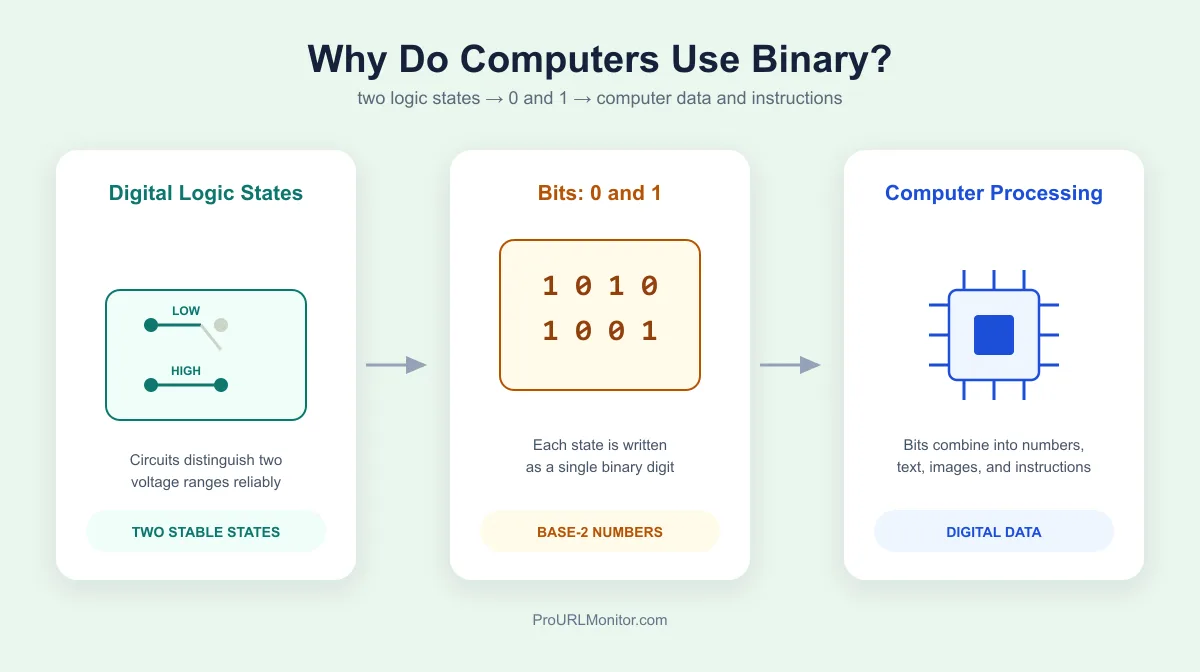
Why Do Computers Use Binary? How 0s and 1s Power Computing
Computers use binary because their electronic circuits are built to reliably tell apart two distinct states, not ten. Those states are labeled 0 and 1, and by themselves they don't mean much — the useful part is how hardware combines millions of them to represent numbers, text, images, sound, and the instructions a processor runs. Here's where that two-state design comes from, what 0 and 1 physically correspond to, and how binary ends up encoding everything a computer does.
Why Do Computers Use Binary?
The short version people usually hear is "computers only understand 0 and 1." That's not wrong, but it's incomplete. Computers don't understand symbols — they're built from digital electronic circuits engineered to reliably distinguish between two conditions, conventionally represented by 0 and 1.
That traces back to transistors, the basic building block of digital logic. A transistor acts as an electronically controlled switch, and switches have a natural affinity for two-state systems: open or closed, low voltage or high voltage. Logic gates are built from these switches and are designed to treat one range of voltages as one logical state and a different range as the other, rather than trying to precisely measure ten distinct voltage levels the way a decimal system would require.
Binary gives that two-state hardware a number system that maps onto it exactly. Every extra bit doubles how many values a circuit can represent, so a small number of simple two-state components can combine to represent enormous numbers, complex text, and detailed instructions. Binary isn't the only option that could theoretically work — it's that building fast, cheap, reliable hardware around two clearly distinguishable states is far more practical than building it around ten.
What Do 0 and 1 Mean Inside a Computer?
Inside a computer, 0 and 1 are symbols, not physical objects. They stand in for two logical states digital circuitry can reliably distinguish, usually called LOW and HIGH.
Physically, those states are implemented as ranges of electrical voltage, not one exact value. A logic family defines a voltage range that counts as LOW and a separate range that counts as HIGH, with a gap between them where a reading is considered invalid. A transistor switches between conducting and not conducting current based on which side of those thresholds it's on, and that switching is what implements a logic gate.
This is why "0 means no electricity and 1 means electricity" is an oversimplification. A LOW state isn't necessarily zero volts, and HIGH isn't some maximum possible voltage — both are defined ranges chosen so circuits can tell them apart despite electrical noise or variation. What matters is that each state is stable and distinguishable, not the literal voltage number. Binary is simply the notation for recording which of those two states a given bit is in.
Why Is Binary More Practical Than Decimal for Computers?
Decimal computers aren't impossible — some early computing machines actually used decimal representations. But building circuits around ten precisely distinguishable voltage levels is a much harder problem than building them around two:
- Noise tolerance. With only two states, a circuit can define wide voltage ranges for LOW and HIGH with a large safety margin between them, so electrical noise is far less likely to flip a reading.
- Simpler switching components. A transistor naturally suits a two-state switch. Making the same component reliably hold ten distinct states adds cost and failure points.
- Simpler logic design. Boolean logic, which underlies digital circuits, is built around two-valued true/false states — binary maps onto that directly.
- Reliability at scale. Modern chips pack billions of transistors into a small area; keeping each one a simple two-state switch is part of what makes that density achievable.
This doesn't mean binary is the only theoretically valid approach — two-state circuits just turned out to be the more practical engineering foundation, and decades of hardware and software have been built on top of it since.
How Binary Represents Numbers
Binary numbers use positional notation, the same idea as decimal, just with a base of 2 instead of 10. Each position is a power of 2, and every digit is 0 or 1. Take 101010:
Binary:    1    0    1    0    1    0
Position: 2⁵   2⁴   2³   2²   2¹   2⁰
Value:    32   16    8    4    2    1
Adding the positions with a 1: 32 + 8 + 2 = 42. So 101010₂ equals 42 in decimal — ordinary positional math with a different base. The Binary to Decimal and Decimal to Binary converters handle both directions with a full place-value breakdown.
How Binary Represents Text
Computers represent letters and symbols the same way they represent numbers: by assigning each character a number, then storing that number in binary. ASCII assigns the capital letter "A" the decimal value 65 — 01000001 in binary. Lowercase "a" is a different code entirely (97).
ASCII only covers 128 characters, though, nowhere near enough for the world's languages and symbols. Modern systems generally use Unicode, most often via UTF-8, which can represent over a million characters. Unlike ASCII's fixed one-byte-per-character scheme, UTF-8 is variable-length: common English characters take one byte, but many others take two, three, or four — so "every character is 8 bits" isn't a safe assumption once text includes anything outside basic ASCII. The ASCII Converter shows this mapping directly.
How Does Binary Represent Images and Sound?
An image is a grid of pixels, and each pixel's color values are stored as binary numbers — not as a single 0 or 1. A common approach stores color as red, green, and blue components, each an 8-bit value from 0–255, for 24 bits per pixel. Compressed formats add further binary-encoded rules for how that pixel data is packed and reconstructed, but the underlying representation is still many bits working together per pixel, not one bit per picture.
Digital audio works similarly: a microphone captures a continuous sound wave, and an analog-to-digital converter measures its amplitude thousands of times per second, recording each measurement as a binary number. Playing those numbers back in order reconstructs the sound.
How Does Binary Tell a CPU What to Do?
A CPU runs machine code — binary data organized into instructions the processor's hardware is built to decode. Each instruction is a bit pattern, and different portions of it typically encode the operation to perform, which registers to use, and what operand or address is involved.
The exact layout of that pattern — how many bits go to the operation code versus the operands — is defined by the processor's instruction set architecture, and it varies between CPU families. An instruction encoded one way on one architecture isn't guaranteed to mean anything, or the same thing, on another, which is why compiled software targets a specific architecture rather than being universally portable at the machine-code level.
What Are Bits and Bytes?
A bit is a single binary digit — one 0 or one 1. A byte is a group of bits, conventionally 8 bits in modern systems. An 8-bit byte can represent 2⁸, or 256, distinct patterns; as an unsigned number, that's a range from 0 (00000000) to 255 (11111111) — exactly why byte-based values, like individual color channels in an image, commonly max out at 255.
Could Computers Use Something Other Than Binary?
Yes — binary isn't the only number system computing has used. Ternary (base-3) computers have been built, including the Setun, developed at Moscow State University in the late 1950s using balanced ternary logic.
Binary became dominant, and stayed dominant, for practical reasons: two-state circuits are simpler to design and manufacture reliably at scale, they tolerate electrical noise well, and Boolean algebra maps directly onto two-valued states. Once binary hardware, instruction sets, and tooling were built around that foundation, the incentive to switch to a different number system largely disappeared, even though alternatives remain technically possible.
How Binary Connects to Boolean Logic
Boolean logic, developed by mathematician George Boole, works with values that are either true or false — which maps directly onto binary: 0 for false, 1 for true. Digital circuits implement Boolean operations — AND, OR, NOT, XOR — as logic gates built from transistors, and those gates are the building blocks every digital computation is assembled from. To work through how these operations behave bit by bit, see the Bitwise Operations calculator.
Binary Arithmetic and Negative Numbers
Because numbers are stored in binary, computers perform addition, subtraction, multiplication, and division directly on binary values, using circuits built from the same logic gates. It's the same base-2 positional math used to represent binary numbers, just applied to combine two values. For the addition rules and carrying in detail, see Binary Addition Explained; for worked examples across all four operations, see the Binary Calculator.
Plain binary only represents non-negative values, though. To store signed integers, modern systems commonly use two's complement: at 8-bit width, -5 is stored as 11111011. It's popular because it lets a processor use the same addition circuitry for positive and negative numbers, without separate sign-handling logic. See Two's Complement Explained for how the encoding works, or the Two's Complement Calculator to convert values directly.
If Computers Use Binary, Why Do Programmers Use Hexadecimal?
Long strings of 0s and 1s are hard for humans to read or debug accurately. Hexadecimal (base 16) converts cleanly to and from binary: exactly four binary bits map to one hex digit, no remainder involved. For example, 11111111₂ converts directly to FF₁₆ — each group of four 1s becomes an F. That's why hex shows up in memory addresses, color codes, and low-level debugging: it's a shorter stand-in for binary, not a different underlying representation. See the Binary to Hex converter for the grouping method, or read the full binary vs hexadecimal comparison for how the two systems relate.
Common Misconceptions About Binary
"Computers literally see 0s and 1s." Computers don't read symbols. 0 and 1 label two logical states that circuits reliably distinguish through voltage ranges and transistor switching.
"Binary can only represent numbers." Binary is a number system, but any information that can be encoded as numbers — text, images, audio, instructions — can be represented in it.
"One byte always stores one character." True for ASCII, not universal. UTF-8 uses one to four bytes per character depending on which character it is.
"0 means electricity off, 1 means electricity on." Logic states are defined voltage ranges and transistor configurations, not a simple presence or absence of current.
"All CPUs use the same binary instructions." Machine code is architecture-specific — the same bit pattern can mean a different instruction, or nothing valid, on a different processor family.
Frequently Asked Questions
Why do computers use binary instead of decimal?
Because digital circuits are built around components, like transistors, that reliably switch between two electrical states. Maintaining and distinguishing ten precise voltage levels for a decimal digit is far harder to do reliably at high speed and low cost than distinguishing two. Binary isn't the only number system a computer could theoretically use, but building hardware around two states is simpler, cheaper, and more resistant to electrical noise.
Why do computers use 0 and 1?
0 and 1 are just the symbols used to label two logical states that digital hardware can tell apart, conventionally called LOW and HIGH. Those states are implemented as voltage ranges and transistor configurations, not as literal printed digits inside the machine. Binary math (base 2) maps naturally onto a two-state system, so 0 and 1 became the standard way to represent and reason about those states.
What does binary mean in computers?
In computing, binary refers to the base-2 number system, where every value is built from just two digits, 0 and 1, instead of the ten digits used in decimal. Each 0 or 1 is called a bit, and computers combine bits to represent numbers, text, images, audio, and the instructions a processor executes.
Can computers use number systems other than binary?
Yes, in principle. Ternary (base-3) computers have been built, including the Setun computer developed at Moscow State University in the late 1950s, which used balanced ternary logic. Multi-valued logic has also been researched in electronics. Binary became the dominant standard because two-state circuits are simpler to design, manufacture, and scale reliably, and decades of hardware, software, and tooling have been built around that choice.
How does binary represent letters?
Text characters are mapped to numbers using a character encoding standard, then those numbers are stored in binary. ASCII assigns the capital letter A the decimal value 65, which is 01000001 in binary. Modern software typically uses Unicode encodings such as UTF-8, which represent a much larger set of characters and use a variable number of bytes per character rather than a fixed one.
How does binary represent images?
A digital image is a grid of pixels, and each pixel's color and brightness values are stored as binary numbers. How many bits describe each pixel depends on the color depth and format; a full-color pixel is typically built from multiple 8-bit values (for example, one each for red, green, and blue), not a single 0 or 1. Compressed formats add further binary-encoded rules for how that pixel data is packed and reconstructed.
Is binary the same as machine code?
They're related but not identical. Binary is the number system, and machine code is the specific set of binary instructions a particular CPU architecture is designed to execute. Machine code encodes operations, registers, and operands as binary bit patterns, but the exact layout of those patterns is defined by the processor's architecture and differs between CPU families.
Try Our Free SEO Tools
Put what you learned into action with our free SEO analysis tools.