DNS Propagation: How It Works, How Long It Takes & How to Check It
"DNS propagation" makes it sound like a single, synchronized rollout — as if your DNS change spreads out from your provider like a wave, reaching the whole internet at some predictable, uniform pace. It doesn't work that way. What's actually happening is much simpler, and once you see it, most of the confusion around DNS propagation — the "24-48 hours" folklore, the "it's still not showing up" panic, the resolvers that disagree with each other — stops being mysterious.
What Is DNS Propagation?
DNS propagation is the informal term for a DNS change becoming visible across the internet's recursive resolvers — the DNS servers that websites, apps, and your ISP actually query on your behalf (as opposed to the authoritative nameservers, which hold the actual, current record for your domain).
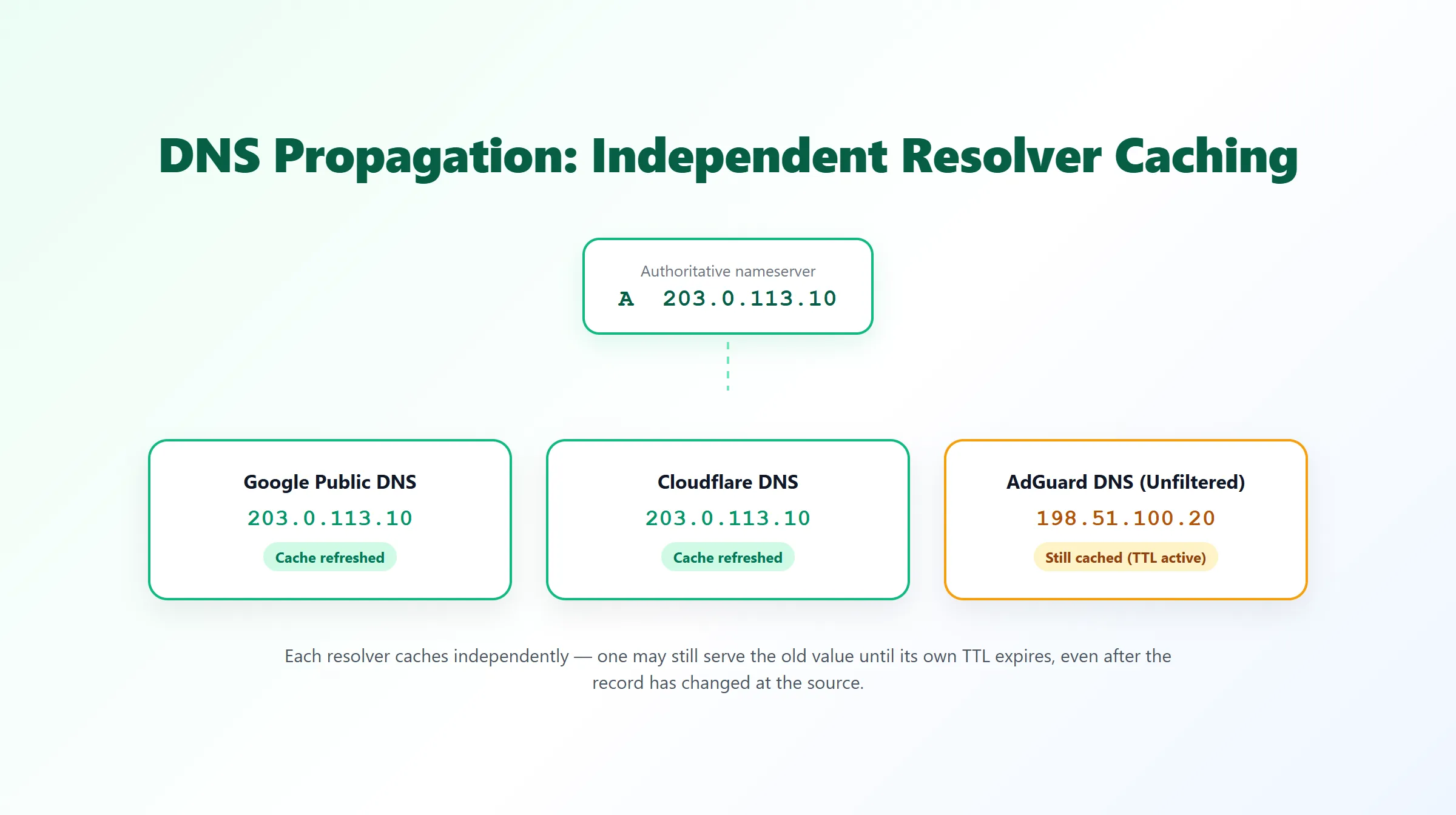
There is no central "propagation" process pushing your change outward. Instead, every recursive resolver that has ever looked up your record keeps its own cached copy for as long as that record's TTL (Time To Live) allows, and only re-queries the authoritative nameserver once that TTL expires. "Propagation" is just the aggregate, informal name for many independent caches expiring and refreshing on their own separate schedules — not one event with a single, measurable speed.
How DNS Propagation Actually Works
- You update a record (say, an A record) at your DNS provider. The authoritative nameservers for your domain now have the new value immediately.
- Any recursive resolver that queries your domain for the first time after the change gets the new value right away and caches it.
- Any resolver that had already cached the old value keeps serving it — not because anything is broken, but because that's exactly what caching means — until that specific cached copy's TTL runs out.
- Once the TTL expires, that resolver's next lookup triggers a fresh query to the authoritative nameserver, and it picks up the current value.
Because step 3 happens on a different clock for every resolver, the "when did it propagate" question doesn't really have one answer. It has as many answers as there are resolvers involved.
How Long Does DNS Propagation Take?
There's no fixed number — but there is a dominant variable: the record's TTL. A record set to a 300-second TTL is typically visible almost everywhere within minutes of the change, because no resolver can hold a stale copy for longer than 5 minutes. A record left at a 24-hour TTL can take up to a full day for some resolvers to catch up, simply because that's the longest any one of them is allowed to cache the old value.
The widely repeated "24-48 hours" figure is a legacy worst-case estimate, not a realistic expectation for a normal, well-configured change. It tends to survive as folklore because it's a safe, conservative thing to tell someone regardless of their actual TTL — but for a record with a sensible TTL (minutes to a few hours), it usually overstates the wait by a wide margin. For the full mechanics of how TTL controls this — including how to lower it deliberately before a planned change — see our DNS TTL guide.
One more factor worth knowing about: negative caching. If a record didn't exist yet (or briefly returned an error) before your change, that "not found" answer can itself be cached for a period — governed by the minimum TTL field in the domain's SOA record — which can make a newly added record take a little longer to appear than a simple value change would. See our NXDOMAIN guide for more on how negative responses get cached.
Why Different DNS Resolvers Can Show Different Results
This is the part that looks like a problem but almost never is. If you check your domain from two different DNS resolvers shortly after a change and get two different answers, it's because those two resolvers cached the record at different times, not because DNS itself is inconsistent. A resolver that queried the record 90 seconds before your change will keep answering with the old value for up to one more TTL period; a resolver that hasn't queried it recently — or ever — will get the current value on its very next lookup.
This is also exactly why a single DNS lookup tool can't tell you much about propagation: it only shows you one resolver's current cached state. Seeing whether several independent resolvers currently agree is what actually gives you a meaningful signal — see how to check DNS propagation below.
Nameserver Changes vs. Record Changes
Not all DNS changes behave the same way. Updating one record (an A, MX, TXT, or CNAME record) only depends on that individual record's TTL, as described above.
Changing a domain's nameservers, on the other hand, is a different kind of change entirely: it's a delegation update at the registrar/registry level, updating which nameservers the parent TLD zone points to for your domain. Those parent-zone NS records are typically cached with long TTLs that you don't control (often set by the registry, not by you), so a nameserver change can take noticeably longer to look consistent everywhere than an ordinary record update — and in the interim, some resolvers may be asking your old nameservers while others have already moved on to the new ones. If you're migrating DNS providers, expect this specifically to be the slower, less predictable part of the process, distinct from any individual record's own TTL.
DNS Propagation by Record Type
The underlying mechanism — independent resolver caching, governed by TTL — is the same for every record type. What differs is typically just the TTL each type tends to be configured with, and how obvious a stale answer looks:
| Record type | Typical propagation behavior |
|---|---|
| A / AAAA | Follows that record's own TTL directly — the most common case, e.g. pointing a domain at a new server IP. |
| CNAME | Same as A/AAAA — follows the CNAME record's own TTL, then the target hostname is resolved in turn. |
| MX | Follows the MX record's TTL; because mail servers often retry deliveries, a brief window of mixed old/new mail routing is usually harmless. See our MX record guide for priority mechanics. |
| TXT | Follows the TXT record's TTL. Relevant for SPF/DKIM/DMARC and verification tokens — some validation checks may need to wait out the old cached value once. |
| NS | Governed by the parent zone's caching of your NS delegation, not a TTL you directly set — see "Nameserver Changes vs. Record Changes" above. |
My DNS Changes Aren't Showing Up — Now What?
Before assuming something is broken, check these in order:
- Confirm the record actually saved correctly at your DNS provider's dashboard. This sounds obvious, but a save that silently failed or applied to the wrong record is far more common than a caching delay, and no amount of waiting fixes it.
- Check the record's TTL. If it's set to a long value (hours), a slow-looking rollout across resolvers is expected behavior, not a fault.
- Rule out negative caching if this is a newly added record — see the note on negative caching above.
- If it's a nameserver change, confirm the delegation is correct at the registrar first; a nameserver change that hasn't actually taken effect at the registry will never "finish propagating," no matter how long you wait.
- Query more than one resolver. If every resolver you check still shows the old value well past the TTL you'd expect, that points toward a real configuration issue rather than ordinary caching — worth double-checking the record itself before waiting any longer.
How to Check DNS Propagation
Because propagation is really "do independent resolvers currently agree," the useful way to check it is to query the same record from more than one resolver and compare — not to look at a single lookup and assume it represents everyone.
ProURLMonitor's free DNS Propagation Checker does exactly this: it queries Google Public DNS, Cloudflare DNS, and AdGuard DNS (Unfiltered) in parallel and shows you, resolver by resolver, whether they currently agree, show different values, or return NXDOMAIN/no record. You can optionally enter the value you expect (say, your new server's IP) and see a direct match/mismatch per resolver instead of just comparing them to each other.
Worth being precise about what this does and doesn't tell you: it's a real comparison across several independent, major public resolvers — not a simulation, and not decorative. But it isn't a claim of geographic or worldwide coverage, and resolver agreement isn't proof that every resolver on the internet — including your visitors' own ISP resolvers or a local/corporate cache — has already refreshed. It's a genuinely useful signal, not a global guarantee.
If you just need to see a domain's current records from a single lookup rather than compare resolvers, that's a different, simpler job — see the DNS Records Checker instead.
Common Misconceptions
- "DNS always takes 24-48 hours." Only true as a conservative worst case for long-TTL records or nameserver delegation changes — not a realistic expectation for a typical, low-TTL record update.
- "If one resolver shows the old value, propagation has failed." Not necessarily — it may simply not have hit its TTL expiry yet. Compare multiple resolvers before concluding anything is wrong.
- "Once my tool says resolvers agree, I'm done everywhere." Agreement across the resolvers a tool actually checks is a strong signal, not a worldwide guarantee — see the caveat above.
- "Lowering TTL after the fact speeds up an in-progress change." It doesn't help resolvers that already cached the old value at the old TTL — the benefit of a lower TTL only applies if you set it before the change, giving old cached copies time to expire on the short timer first.
Frequently Asked Questions
What is DNS propagation?
"DNS propagation" is the informal term for DNS changes becoming visible across the internet's recursive resolvers. There's no single rollout event — each resolver that has ever looked up a record keeps its own cached copy until that record's TTL expires, then re-queries and picks up the current value. What looks like one gradual "propagation" is really many independent caches expiring on their own separate schedules.
How long does DNS propagation take?
There's no fixed answer — it depends on the TTL of the specific record you changed and when each resolver last cached it. A record with a 300-second TTL is typically visible almost everywhere within minutes. A record with a 24-hour TTL can take up to a day for some resolvers to refresh. The commonly repeated "24-48 hours" figure is closer to an old worst-case estimate — for a well-configured record with a reasonable TTL, it's rarely accurate.
Why do different DNS resolvers show different results for the same domain?
Because each resolver caches independently. If Resolver A queried your record 2 minutes before you changed it and Resolver B queried it 2 minutes after, A will keep serving the old value until its cached copy's TTL expires, while B already has the new one. Neither resolver is wrong — they simply cached at different moments.
Is changing nameservers the same as changing a DNS record?
No. Changing a single record (like an A or MX record) only depends on that record's own TTL. Changing a domain's nameservers is a delegation change at the registrar/registry level, which involves the parent zone's NS records — those are typically cached by resolvers with long TTLs that you don't control, so nameserver changes often take noticeably longer to look consistent than an ordinary record update.
Why isn't my DNS change showing up yet?
Most often, it's simply that some resolvers haven't hit their TTL expiry yet — this is expected, not a bug. Less commonly, the record may not have actually saved correctly at your DNS provider, a negative (NXDOMAIN/empty) answer may still be cached from before the record existed, or — for nameserver changes — the delegation itself may not have updated correctly at the registrar. Checking the record directly at your DNS provider's dashboard rules out the first possibility before you spend time waiting on caches.
Is DNS propagation the same thing as DNS TTL?
They're related but not the same. TTL is the actual mechanism — the cache lifetime set on one specific record. "Propagation" is the informal, broader idea of a change becoming visible everywhere. TTL is the biggest single factor in how fast that happens, but it isn't the whole picture — see our dedicated guide to DNS TTL for the caching mechanics in full.
How can I check DNS propagation for my domain?
Query the record from more than one independent DNS resolver and compare what each one currently returns. ProURLMonitor's free DNS Propagation Checker does this automatically — it queries Google Public DNS, Cloudflare DNS, and AdGuard DNS (Unfiltered) in parallel and shows whether they currently agree, differ, or match a value you specify.
Does resolver agreement prove my DNS change has propagated worldwide?
No, and no tool can honestly promise that. Agreement across several major independent resolvers is a meaningful, useful signal — but it doesn't account for every resolver worldwide, your visitors' ISP resolvers, or local/corporate DNS caches, any of which could still be serving an older cached value until their own TTL runs out.
Try Our Free SEO Tools
Put what you learned into action with our free SEO analysis tools.