Open Graph Tags: What They Are & How to Use Them
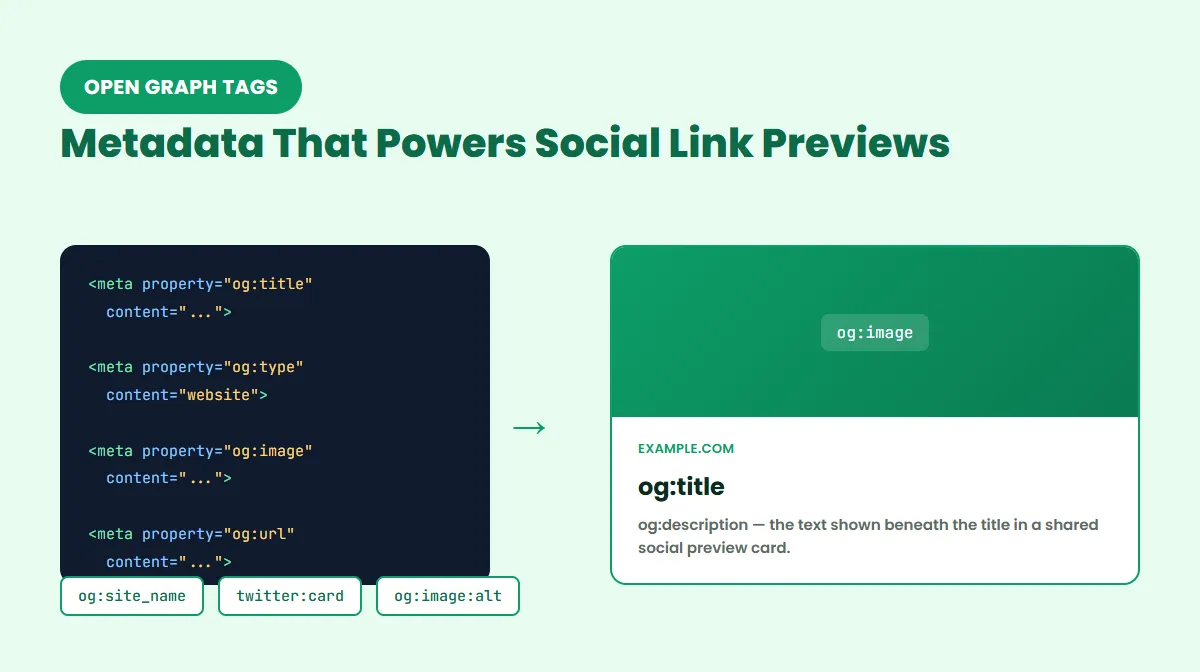
A page's title tag and meta description are written for search engines. Open Graph tags are written for a different moment entirely — when someone pastes your URL into Facebook, LinkedIn, Slack, or a text message, and a platform needs to know what title, image, and description to show for that shared link.
Get Open Graph tags wrong, and a shared link shows a blank box, a random scraped image, or no preview at all. Get them right, and every share looks intentional. This guide covers what Open Graph actually is, the properties that make it work, how og:image sizing works in practice, and how Twitter/X Card tags fit alongside Open Graph rather than replacing it — sourced from the official Open Graph protocol and current platform documentation rather than recycled SEO-blog rules.
What Is Open Graph?
Open Graph is a metadata protocol, originally introduced by Facebook, that lets any webpage describe how it should be represented when shared in a social context — as an object with a title, an image, a type, and a canonical identity, rather than just a raw URL. The official specification defines it as turning "any web page into a rich object in a social graph."
It's worth being precise about what that means in practice: Open Graph's job is social and link-preview presentation, not search ranking. It doesn't directly improve where a page places in Google results. Where it can matter indirectly is engagement — a page with a clear, accurate social preview is more likely to earn a click when it's shared than one with a broken or generic-looking one, though that's a matter of presentation, not a scored ranking input.
What Are Open Graph Tags?
Open Graph tags are the individual <meta property="og:..."> elements that implement the protocol. Each one declares a specific piece of metadata about the page — its title, its representative image, what kind of object it is, and so on. Platforms that support Open Graph (Facebook, LinkedIn, Slack, WhatsApp, and others) read these tags when a URL is shared and use them to render the preview card.
These tags live in the page's HTML <head>, alongside the title tag, meta description, and other page metadata:
<meta property="og:title" content="Example Title">
<meta property="og:type" content="website">
<meta property="og:image" content="https://example.com/image.jpg">
<meta property="og:url" content="https://example.com/page/">
The Four Basic Open Graph Properties
According to the Open Graph protocol documentation, four properties make up the required basic metadata for any Open Graph object:
og:title
The title of the object as it should appear in the share — usually the page's headline. It can be identical to your <title> tag, but doesn't have to be; some sites write a slightly shorter or more attention-grabbing version for social contexts. A common implementation issue is leaving og:title unset entirely, which forces platforms to fall back to guessing a title from the page's own <title> tag or content.
og:type
Declares what kind of object the page represents — website is the default for most pages, with article commonly used for blog posts and news content. The protocol also defines more specific types, like book, video.movie, and music.song, mainly relevant if a page represents that kind of object. A frequent issue is leaving og:type off entirely (it isn't as visually obvious as a missing title or image, but a mismatched or missing type can still affect how some platforms categorize the shared object).
og:image
A URL pointing to an image that represents the page. This is the property that most visibly makes or breaks a share — a missing or broken og:image typically means the preview renders as a plain text card, if it renders at all. The URL must be absolute (a full https://... address, not a relative path) and must resolve to a publicly accessible image; a URL blocked by authentication or robots restrictions won't be fetchable by a social platform's crawler.
og:url
The canonical URL of the object within the Open Graph graph — the address that a share should be permanently associated with. If og:url is missing, platforms typically fall back to the URL that was actually shared, which can cause inconsistent results if the same content is reachable at multiple URLs (see og:url vs. canonical URL below for how this differs from search-engine canonicalization).
Other Useful Open Graph Tags
Beyond the four basic properties, a few additional tags are commonly used, though none of them are required by the protocol.
og:description
og:description provides the supporting text shown beneath the title in a social preview card. It's genuinely useful, widely supported metadata — but it is not one of the four required basic properties, a distinction that's easy to get backwards since it's often assumed to be required alongside title, image, and URL.
og:description is also a separate piece of metadata from <meta name="description">. They can contain similar or even identical text, but they serve different consumers: the standard meta description is aimed at search engine snippets, while og:description is aimed at social preview cards. There's no requirement that they match.
og:site_name
og:site_name declares the name of the overall site the page belongs to (for example, "ProURLMonitor" rather than the page's own title). It's a minor, supporting property — worth setting for brand consistency across shares, but not something that meaningfully changes how a preview renders on its own.
Structured image metadata
The protocol also defines optional sub-properties that add detail to og:image:
- og:image:url — functionally identical to
og:imageitself - og:image:secure_url — an alternate HTTPS URL for the same image, if needed
- og:image:type — the image's MIME type (e.g.
image/jpeg) - og:image:width / og:image:height — the image's pixel dimensions
- og:image:alt — a text description of the image
Declaring og:image:width and og:image:height can help a platform render the preview correctly on the first load rather than needing to fetch and measure the image itself. og:image:alt should describe what's actually in the image — meaningful alternative text, not a place to repeat target keywords.
The protocol also supports multiple og:image tags on the same page. Per the specification, when properties conflict, the tag that appears first (top to bottom) in the HTML takes preference — though which image a given platform actually chooses to display isn't guaranteed to be identical across every platform.
Open Graph Image Size and Best Practices
The Open Graph protocol itself does not mandate a required image size — there is no official "must be exactly 1200×630" rule in the specification.
What does exist is widely used platform-common guidance: an image around 1200×630 pixels (roughly a 1.91:1 aspect ratio) tends to display cleanly across Facebook, LinkedIn, and similar platforms without awkward cropping. Treat that as practical convention, not a protocol requirement — and note it's a different number from any particular site's own blog-featured-image convention, which may be sized differently for its own layout needs. If a platform's own current documentation states a different recommended size, that platform's documentation takes precedence over any general rule of thumb.
Beyond raw dimensions, a few practical points matter more than hitting an exact pixel count:
- The image URL must be absolute and publicly accessible — not behind a login wall or blocked by server-side restrictions that would stop a social crawler from fetching it.
- Different platforms crop preview images differently, so keep the most important visual content (a headline, a face, a logo) away from the extreme edges.
- A meaningful
og:image:altvalue helps accessibility tools describe the image, separate from any effect on how it's cropped or displayed.
Open Graph Tags and SEO
Do Open Graph tags affect SEO rankings? Not directly. Open Graph tags are not part of Google's ranking systems — they're read by social platforms, not by Google's search-ranking algorithm. Setting or omitting them doesn't move a page up or down in search results.
Where they can matter is indirect: a page that shares cleanly, with an accurate title, image, and description, is more likely to earn clicks and shares when someone actually posts the link — and that's a matter of presentation and engagement, not a scored SEO input. Avoid treating Open Graph as an SEO lever; treat it as a social-presentation one.
Open Graph vs. Meta Description and Canonical Tags
It's easy to conflate Open Graph with two other pieces of page metadata it sits alongside. Briefly:
<meta name="description">feeds search engine result snippets. It's read by Google and other search engines, not by social platforms.og:descriptionfeeds social preview cards. It's read by Facebook, LinkedIn, Slack, and similar platforms, not by Google's snippet generation.<link rel="canonical">is a search-indexing signal about which URL should be treated as the preferred version among duplicates — see og:url vs. canonical URL below, and our dedicated Canonical Tag guide for the full picture.
They can reuse similar wording, but each is read by a different consumer, so there's no requirement to keep them identical. For the broader picture of how all of a page's metadata fits together — title tags, meta descriptions, robots, and canonical — see our Meta Tags for SEO guide.
Twitter/X Card Meta Tags
Alongside Open Graph, X (formerly Twitter) has its own metadata format called Twitter Cards — still the standard technical term in X's own developer documentation, even though the platform itself is branded X. Twitter Card tags use twitter:-prefixed names instead of og:-prefixed ones:
<meta name="twitter:card" content="summary_large_image">
<meta name="twitter:title" content="Example Title">
<meta name="twitter:description" content="...">
<meta name="twitter:image" content="https://example.com/image.jpg">
<meta name="twitter:site" content="@yourhandle">
<meta name="twitter:creator" content="@authorhandle">
- twitter:card — declares the card type (see below)
- twitter:title / twitter:description / twitter:image — the same role as their Open Graph counterparts, specific to X
- twitter:site — the X handle of the site or publication
- twitter:creator — the X handle of the individual author, where relevant
Twitter/X Card Types
The two card types relevant to most standard web pages are:
- summary — a smaller card with a compact thumbnail image alongside the title and description
- summary_large_image — a full-width hero image with the title and description below it
summary_large_image is the more commonly used type for typical articles and pages, since it produces a larger, more visually prominent preview. X's card documentation also defines additional card types (such as app and player cards) aimed at specific use cases like app installs or embedded media — outside the scope of a standard content page.
Twitter/X Fallback to Open Graph
If a page has Open Graph tags but no twitter:-specific tags at all, X commonly falls back to using existing Open Graph values (such as og:title, og:description, and og:image) to build the card. This fallback isn't a reason to skip Twitter tags entirely, though — setting at least twitter:card explicitly gives you direct control over which card layout renders, rather than leaving that choice entirely to platform-side fallback behavior.
Twitter/X Image Size
Image guidance for X cards depends on which card type is in use, so a single universal number doesn't apply cleanly across both:
- summary_large_image commonly uses the same roughly 1200×630 (1.91:1) sizing that works well for Open Graph generally.
- summary cards use a much smaller, closer-to-square thumbnail, so an image cropped for a large hero card won't necessarily look right in a summary card's compact format.
As with Open Graph image sizing generally, treat these as practical, platform-common targets rather than a fixed protocol requirement — and consult X's current developer documentation directly if exact specifications matter for your use case, since platform specifics can change.
Open Graph vs. Twitter/X Cards
| Open Graph | Twitter/X Card | |
|---|---|---|
| Attribute used | property | name |
| Title | og:title | twitter:title |
| Description | og:description | twitter:description |
| Image | og:image | twitter:image |
| URL identity | og:url | (no direct equivalent) |
| Platforms | Facebook, LinkedIn, Slack, WhatsApp, and others | X specifically |
| Fallback | N/A | Can fall back to Open Graph values when its own tags are absent |
The two are complementary, not competing — most sites are best served by setting Open Graph tags thoroughly, then adding twitter:card (and twitter:site/twitter:creator if attribution matters) to control how the card looks specifically on X.
og:url vs. Canonical URL
These two are often confused because they can point to the same address, but they serve entirely different systems:
- og:url declares a page's identity within the Open Graph graph — the URL a social share should be permanently associated with.
<link rel="canonical">is a search-indexing signal, read by Google and other search engines, declaring which URL should be treated as the preferred version among duplicates.
They frequently point to the same preferred URL for a given page, but og:url has no bearing on search indexing, and a canonical tag has no bearing on how social platforms build a share preview. Neither is a substitute for the other. For the full breakdown of how canonicalization works — self-referencing canonicals, cross-domain use, and common mistakes — see our dedicated Canonical Tag guide.
Common Open Graph Tag Mistakes
- Missing
og:image— the single most visible failure; without it, most platforms render a plain text card or skip the preview image entirely. - A relative or broken image URL —
og:imagemust be an absolute, publicly reachable URL; a relative path or a URL blocked from crawlers won't resolve. - Wrong image dimensions or aspect ratio, causing awkward cropping on the platform's preview layout.
- Missing
og:url, leaving platforms to fall back to whatever URL was actually shared — which can create inconsistent previews if the same content is reachable at more than one address. og:urldisagreeing with the page's preferred/canonical URL, sending a mixed signal about which address represents the content.- Duplicate or conflicting Open Graph properties on the same page, rather than one consistent set.
- A generic title or description copied straight from the page's SEO title/description without adapting it for a social context.
- An inaccurate
og:type, mislabeling what kind of object the page represents. - A stale cached social preview, where a platform continues showing outdated Open Graph data after the page's tags have changed (see below).
- Metadata injected only by client-side JavaScript, which some social crawlers may not execute the way a browser does — see the next section.
- Missing Twitter/X-specific tags where more precise control over the X card matters, relying entirely on Open Graph fallback instead.
JavaScript-Injected Social Metadata
Some social platforms' crawlers fetch a page's raw server HTML and don't necessarily execute JavaScript the way a browser does. If Open Graph or Twitter Card tags are only injected into the <head> after client-side JavaScript runs — common in some single-page app setups — those tags may not be visible to a social crawler at all, even though a browser would eventually render them. Where practical, prefer server-rendered metadata for Open Graph and Twitter Card tags rather than relying solely on client-side injection.
Social Preview Caching
Platforms that support Open Graph commonly cache the metadata and image they scrape from a URL. If you update a page's Open Graph tags and still see an old preview when sharing it, platform-side caching is a common reason — not necessarily a sign your tags are broken. Official debugging tools (below) can trigger a fresh scrape on some platforms, though none of them guarantee an exact refresh timeline.
How to Check Open Graph and Twitter Card Tags
Rather than viewing page source by hand, ProURLMonitor's Meta Tag Checker fetches a live URL and displays the actual og:title, og:description, og:image, og:url, og:type, and og:site_name values found in that page's server HTML, along with twitter:card, twitter:title, twitter:description, twitter:image, twitter:site, and twitter:creator — plus a social preview built from those extracted values.
Two things worth being precise about: the checker analyzes the HTML your server actually returns, so metadata injected only by client-side JavaScript after the page loads won't be detected (see JavaScript-Injected Social Metadata above). And its social preview is an approximation built from the real extracted tag values — it isn't a guarantee of exactly how Facebook, X, or LinkedIn will render the share, since each platform applies its own layout and cropping.
For platform-specific previews and cache refreshes, two official tools are still useful:
- Facebook Sharing Debugger — shows how a URL's Open Graph tags currently render on Facebook and can trigger a fresh scrape.
- LinkedIn Post Inspector — previews how a URL will appear when shared on LinkedIn.
(X's own Card Validator has been discontinued, so it isn't included here — for X specifically, the Meta Tag Checker above covers the "what tags does this page actually have" question without depending on a dead tool.)
Open Graph Best Practices
- Set all four basic properties —
og:title,og:type,og:image, andog:url— on every page, not just some of them. - Use an absolute, publicly accessible URL for
og:image, sized around a common 1200×630-style ratio unless a specific platform's current documentation says otherwise. - Add
og:descriptionfor supporting preview text, but don't assume it's interchangeable with your standard meta description. - Keep
og:urlconsistent with the page's actual preferred URL rather than letting it drift from your canonical tag. - Set at least
twitter:card(typicallysummary_large_image) rather than relying entirely on X's fallback to Open Graph. - Prefer server-rendered metadata over client-side-injected tags, since some social crawlers don't execute JavaScript.
- If a preview looks stale after an update, check for platform-side caching before assuming the tags themselves are wrong.
Frequently Asked Questions
What are Open Graph tags?
Open Graph tags are HTML <meta property="og:..."> elements in a page's <head> that describe how the page should be represented when shared on platforms that support the Open Graph protocol, such as Facebook, LinkedIn, Slack, and WhatsApp — controlling the title, image, and other details shown in the shared preview.
What are the four required Open Graph properties?
According to the official Open Graph protocol, the four basic properties are og:title, og:type, og:image, and og:url. og:description is useful, commonly-added metadata, but it is not one of these four required basic properties.
Do Open Graph tags affect SEO?
Not directly. Open Graph tags are not a Google ranking factor — their primary role is controlling how a page looks when shared on social platforms, not how it's evaluated by search engines. Any effect on organic traffic would be indirect, through clicks earned from a clearer or more compelling social share.
What size should an Open Graph image be?
The Open Graph protocol itself sets no required image size. 1200×630 pixels (a roughly 1.91:1 ratio) is a commonly used practical size that displays well across most platforms without awkward cropping, but that's platform-common guidance, not a protocol rule — it's also a different convention than any single site's own blog-image dimensions.
What is the difference between Open Graph and Twitter Cards?
Open Graph is a broader protocol used by Facebook, LinkedIn, Slack, and other platforms; Twitter/X Cards are X's own metadata format, using twitter:-prefixed tag names instead of og:-prefixed ones. X can fall back to certain Open Graph values when twitter: tags are missing, but the two remain separate metadata systems.
Can I use Open Graph tags without Twitter Card tags?
Yes. If you set Open Graph tags but no twitter: tags, X commonly falls back to your og:title, og:description, and og:image. At minimum, adding just twitter:card (typically summary_large_image) alongside your existing Open Graph tags gives you more explicit control over how the card renders on X.
What is the difference between og:url and a canonical URL?
og:url declares a page's identity within the Open Graph graph — the URL a share should be associated with. The canonical tag (<link rel="canonical">) is a separate search-indexing signal about which URL search engines should treat as the preferred version. They often point to the same URL, but they're read by different systems and one isn't a substitute for the other.
How do I check the Open Graph tags on a website?
ProURLMonitor's Meta Tag Checker fetches a live URL and displays the actual og:title, og:description, og:image, og:url, og:type, og:site_name, and Twitter/X Card values found in that page's server HTML, along with a social preview built from those extracted values.
Try Our Free SEO Tools
Put what you learned into action with our free SEO analysis tools.