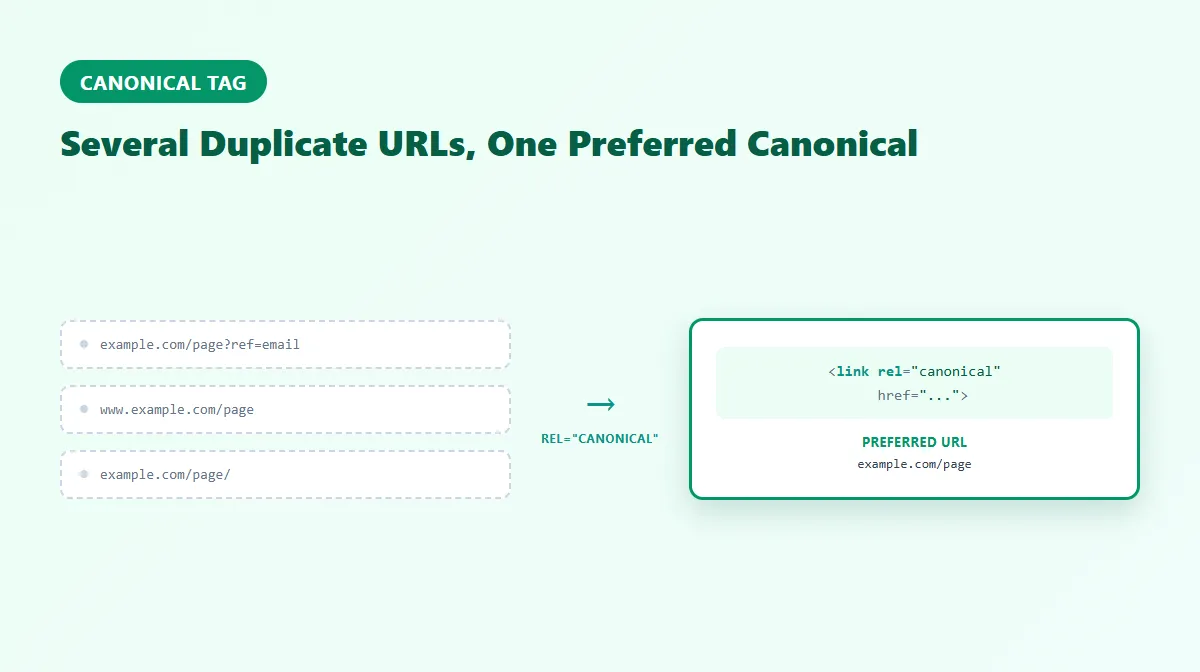
Canonical Tag: What It Is & How Canonical URLs Work
A canonical tag — written as <link rel="canonical" href="..."> — tells search engines which URL you consider the preferred, representative version when the same or substantially similar content exists at more than one address. It's one of the most common ways sites signal a canonical URL: the version meant to be indexed and shown in search results.
Duplicate and near-duplicate URLs are normal on almost every site — tracking parameters, www vs. non-www, trailing slashes, printer-friendly pages, and faceted product listings all create them without anyone intending to. This guide covers what a canonical tag actually is, how canonicalization works, when to use it (and when a redirect or noindex is the better tool), and the mistakes that most often break it — sourced directly from Google's own documentation.
What Is a Canonical Tag?
A canonical tag is an HTML <link> element, not a <meta> tag, placed in a page's <head>:
<link rel="canonical" href="https://example.com/preferred-page/" />
It declares a preference: "if you find this content duplicated elsewhere, treat this URL as the main one." According to Google's own documentation, Google treats this as a signal, not a directive — a strong hint it usually follows, but not a binding instruction. If other evidence points elsewhere, Google can and does choose a different URL as canonical.
What Is a Canonical URL?
A canonical URL is the specific URL that ends up treated as the representative, authoritative version among a set of duplicate or very similar pages. Google's own terminology calls this process canonicalization or deduplication — picking one URL to represent a piece of content so search results don't show several near-identical versions of the same page.
The canonical tag is one way to declare your preferred canonical URL. It's not the only signal Google considers, and — as covered below — Google can and sometimes does select a different URL than the one you declared.
How Canonical Tags Work
A canonical tag should:
- Use an absolute URL (including protocol and domain), not a relative path — relative URLs can resolve inconsistently depending on how a page is served.
- Appear once per page, in the
<head>section — a canonical tag placed in the<body>is disregarded, and multiple canonical tags on one page cause some or all of them to be ignored. - Point to a URL that is itself accessible and indexable — normally returning an actual
200 OKresponse, not a redirect, a404, or a page blocked byrobots.txtor markednoindex. If the canonical target can't be verified, Google's own guidance says the tag is likely to be ignored.
When Should You Use a Canonical Tag?
Use a canonical tag whenever the same or substantially similar content is reachable at more than one URL and you want that content to stay accessible at each of those URLs. Realistic, common cases include:
- HTTP vs. HTTPS, or
wwwvs. non-wwwversions of the same page - Trailing slash vs. no trailing slash URL variants
- Tracking or marketing parameters (
?utm_source=...,?ref=...) appended to an otherwise identical page - Faceted or filtered listings (e.g., a product category sorted or filtered in a way that doesn't meaningfully change the content)
- Printer-friendly or alternate-format versions of the same article
- Near-duplicate product or category pages that genuinely cover the same content from a different URL
Be careful not to over-apply this: a filtered or parameterized URL that actually shows meaningfully different content (a genuinely different product set, not just a different sort order) may deserve to be indexed on its own rather than canonicalized away. Canonicalization is for true duplicates and near-duplicates, not a blanket fix for every URL variant.
Self-Referencing Canonical Tags
A self-referencing canonical is a canonical tag whose href points back to the exact URL of the page it's on. It's widely recommended as a default, even for pages with no known duplicates, because it removes ambiguity about which version of a URL is preferred and adds a layer of protection against duplicate content you don't control — a scraped copy, an unexpected parameter variation, or a staging URL that leaks into search.
It isn't strictly mandatory for every single page, but it's a low-cost, low-risk default most sites apply site-wide.
Canonical Tags vs. Redirects
These solve different problems, and mixing them up is one of the more common canonicalization mistakes.
A redirect (301, 308, or otherwise) sends users and crawlers to a different URL — the original URL stops functioning as an independent destination. Use a redirect when the old URL genuinely shouldn't exist as its own page anymore. Our guides on 301 redirects and 301 vs. 302 redirects cover redirect behavior and status-code selection in depth — this article won't duplicate that content.
A canonical tag lets the current URL remain accessible while signaling which version should be treated as preferred for indexing purposes. Use it when duplicate or similar URLs need to stay reachable — for example, a tracking-parameter URL that real visitors click through and should keep working, even though you don't want it indexed as a separate page from the clean version.
Canonical Tags vs. Noindex and Robots.txt
These three tools are easy to conflate, but they solve different problems:
- A canonical tag signals a preferred version among pages that can all be crawled and indexed — it doesn't remove a page from consideration, it points to which one should represent the group.
- A
noindexdirective is a request not to index a specific page at all, regardless of duplicates. robots.txtblocks crawling access entirely — and that's exactly why it doesn't work as a canonicalization method: if a crawler can't access a page, it can't read that page's canonical signal either. Blocking the canonical target inrobots.txtis a documented cause of Google ignoring a canonical tag.
Combining a canonical tag with a noindex tag on the same page sends a mixed signal (a page telling search engines both "here's my preferred version" and "don't index me") and is generally discouraged — if a page shouldn't be indexed, noindex alone is the clearer tool.
Cross-Domain Canonicals
rel=canonical can point to a URL on an entirely different domain — a legitimate, supported use case for syndicated or licensed content, where a republishing site credits the original source as canonical.
This is not a guaranteed duplicate-content shield, though. Google can still choose to index the syndicating domain's copy instead of the declared canonical if its own evaluation disagrees — the same "signal, not directive" behavior applies across domains just as it does within one site.
Canonical Chains and Conflicting Signals
Avoid canonical chains — Page A's canonical pointing to Page B, whose own canonical then points to Page C. Point directly to the final intended canonical URL wherever practical; Google hasn't published a strict hop limit for this, but a chain adds unnecessary ambiguity for no benefit.
Google's own team has indicated it weighs roughly 40 different signals when determining a canonical URL — redirects, the canonical tag itself, sitemaps, internal linking patterns, and more. When these signals agree (your internal links, sitemap entries, and canonical tags all point to the same URL), that consistency is a stronger overall signal than a canonical tag declared in isolation while everything else on the site points elsewhere. Conflicting signals — a canonical tag pointing to URL B while your sitemap and internal links favor URL A — are a documented reason Google may select a different canonical than the one declared.
HTTP Headers and JavaScript-Injected Canonicals
For non-HTML files like PDFs, Google supports declaring a canonical via an HTTP Link header rather than an HTML tag, since there's no <head> to place one in. This is currently a Google-specific mechanism, not a universal web standard other search engines are confirmed to support the same way.
Canonical tags can also be injected via JavaScript, and Google has stated this is supported but not recommended — canonical signals present in the raw HTML are processed earlier and more reliably than ones added after JavaScript runs. Google's guidance is to either set the canonical directly in the initial HTML to match what JavaScript would render, or, if that's genuinely not possible, to leave it out of the initial HTML entirely rather than risk the raw HTML and rendered versions disagreeing.
Common Canonical Tag Mistakes
Per Google's own canonicalization troubleshooting documentation, the most common issues include:
- Broken tag syntax — a typo, a missing quote, or malformed markup that fails to parse as intended
- Multiple canonical tags on one page — when this happens, some or all of them may be ignored
- Canonical pointing to a non-existent or blocked page — a
404, or a URL disallowed inrobots.txtthat Google can't access to verify - Canonical pointing to a redirect or an error page instead of a final, live destination
- Incorrect placement — a canonical tag inside
<body>instead of<head>is disregarded - Relative instead of absolute URLs, which can resolve inconsistently
- Pointing every page site-wide at the homepage — a canonical only makes sense for genuinely duplicate/near-duplicate content, not as a way to consolidate unrelated pages
- Inconsistency with sitemaps and internal links — sending mixed signals about which URL is actually preferred
Not every mistake is equally severe: a stray relative URL is a smaller problem than site-wide canonicals all pointing at the homepage, which can suppress indexing of pages that should stand on their own.
How to Check a Canonical Tag
You don't have to view page source by hand to see what canonical tag a page is actually using. ProURLMonitor's Meta Tag Checker fetches a live URL and extracts its real canonical value from the page's server HTML — resolving relative URLs to absolute ones, flagging multiple canonical tags if present, comparing the declared canonical against the page's own final URL (after any redirects), and noting if the canonical points to a different domain.
One important distinction the checker doesn't erase: what it shows you is the HTML-declared canonical — the value actually present in the page's markup. That is not the same as Google's selected canonical. Google Search Console's URL Inspection tool separately reports a "User-declared canonical" and a "Google-selected canonical," and the two can differ if Google's own evaluation disagrees with what a page declares. Checking the declared tag is a useful first step for catching broken syntax, wrong targets, or duplicates — it isn't a substitute for checking Search Console if you need to know what Google actually chose.
For a broader look at a page's full metadata — title, description, robots, Open Graph, and Twitter/X tags alongside canonical — see our Meta Tags for SEO guide, which covers the wider page-metadata picture this article's canonical section only summarized.
Canonical Tag Best Practices
- Use a self-referencing canonical on every page as a sensible default.
- Always use an absolute URL, matching the protocol (HTTP/HTTPS) and domain the page is actually served from.
- Keep it to one canonical tag per page, in the
<head>. - Make sure the canonical target itself is live, indexable, and returns 200 — never a redirect, error page, or blocked URL.
- Keep canonical tags consistent with your sitemap and internal links — point all of them at the same preferred URL.
- Avoid canonical chains; point directly at the final intended URL.
- Don't combine canonical with
noindexon the same page unless you specifically intend to signal both at once — and understand that's a mixed message. - Treat cross-domain canonicals as a hint you're providing, not a guarantee Google will honor.
Frequently Asked Questions
What is a canonical tag?
A canonical tag is an HTML link element, written as <link rel="canonical" href="...">, placed in a page's <head>. It declares which URL you consider the preferred, representative version when the same or very similar content is reachable at more than one address. It's a signal to search engines, not an absolute directive.
What is a canonical URL?
A canonical URL is the specific URL treated as the authoritative version among a set of duplicate or substantially similar pages. The canonical tag is one mechanism (though not the only one) for declaring which URL that should be. Google may also select its own canonical URL independently, based on multiple signals, if none is declared or if it disagrees with the one you've set.
Do canonical tags affect SEO rankings?
Not directly as a ranking factor, but they affect SEO indirectly by helping consolidate signals like links and content evaluation onto one URL instead of splitting them across duplicates. Get canonicalization wrong and you risk diluting those signals across near-identical pages; get it right and search engines have a clearer, more consistent picture of which URL to show and evaluate.
Should every page have a canonical tag?
A self-referencing canonical (a page's canonical tag pointing to itself) is widely recommended as a default best practice, even for pages with no known duplicates — it removes ambiguity and protects against unexpected duplicate URLs (like parameter variations or scraped copies) appearing later. It isn't strictly mandatory for every single page, but it's a low-cost, low-risk default.
Can a canonical tag point to another domain?
Yes, technically — rel=canonical can point to a URL on a different domain, which is sometimes used for syndicated or licensed content to credit the original source. However, Google may still choose its own canonical regardless of what you declare, so a cross-domain canonical is not a guaranteed duplicate-content shield.
What is the difference between a canonical tag and a 301 redirect?
A 301 redirect sends users and crawlers to a different URL and the original URL stops being independently accessible. A canonical tag lets the original URL remain accessible while signaling which version should be treated as preferred. Use a redirect when the old URL shouldn't exist as its own destination anymore; use a canonical when duplicate or similar URLs need to stay reachable.
Can Google ignore a canonical tag?
Yes. Google has stated it treats rel=canonical as one signal among many — reportedly around 40 different signals, according to members of Google's own webspam/duplicates team — and can select a different URL as canonical if other signals (content quality, redirects, internal links, sitemaps) point elsewhere. A canonical tag is a strong hint, not an enforceable rule.
Try Our Free SEO Tools
Put what you learned into action with our free SEO analysis tools.