Do QR Codes Expire? Static vs Dynamic QR Codes Explained
Short answer: no, not in the way a coupon or a login link expires. There's no expiration date built into a QR code — the standard that defines them doesn't include a timer. But a QR code can still stop working, and understanding why requires separating two different things: the QR code itself, and whatever it's connected to.
Do QR Codes Expire?
A QR code is a matrix barcode — a grid of black and white squares that a scanner decodes into data. That's the whole mechanism. Nothing in the ISO/IEC 18004 standard that defines the QR Code symbol includes an expiration date, a validity window, or a built-in timer. DENSO WAVE, the company that invented QR codes, describes them purely in terms of data capacity, structure, and error correction — there's no mention of codes expiring because none of that is part of what a QR code is.
So the pattern itself is permanent in a narrow sense: it will decode to the same data for as long as the image stays intact and readable, whether that's tomorrow or in ten years.
What can stop working is whatever that data points to. If a QR code encodes a URL, the code keeps decoding to that exact URL forever — but the webpage at that URL might not exist anymore. That's the real distinction behind "do QR codes expire": people usually mean "did this QR code stop working," and the answer to that depends on what's on the other end of it, not on the QR code aging out.
Static vs Dynamic QR Codes
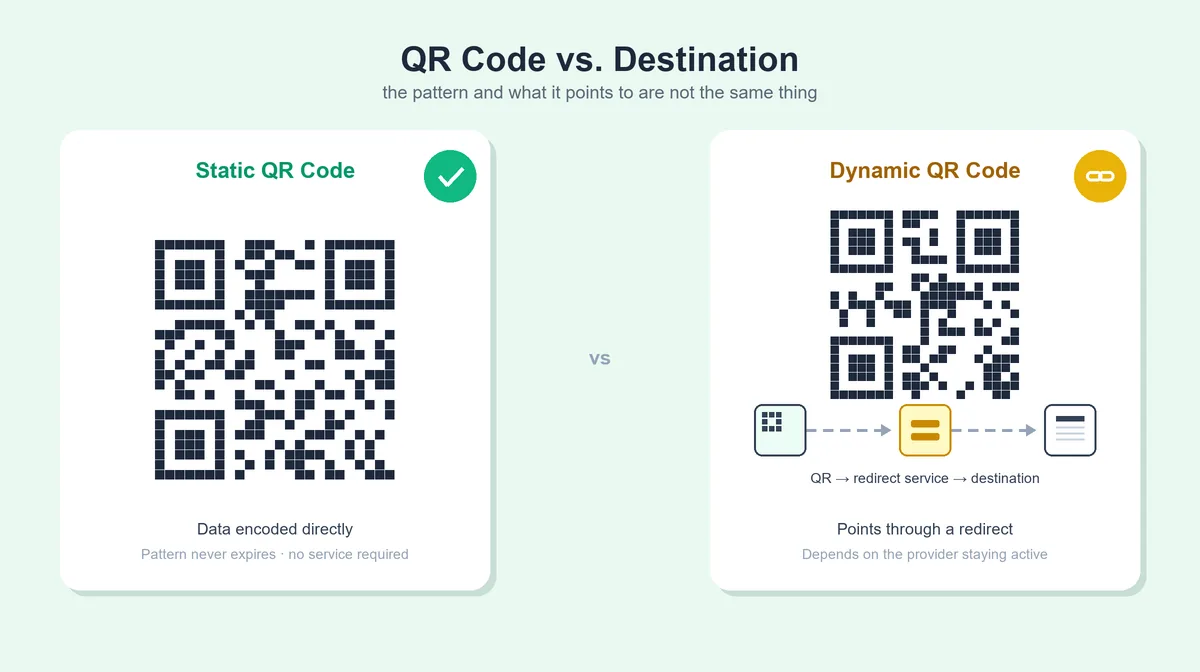
"Static" and "dynamic" aren't part of the QR code standard — they're a distinction QR code generator tools use to describe how the code is built. It matters here because it changes what "the code stopped working" actually means.
| Feature | Static QR Code | Dynamic QR Code |
|---|---|---|
| What's encoded | The actual data (URL, text, Wi-Fi credentials, vCard) directly in the pattern | A short redirect URL controlled by a service, which forwards to your real destination |
| Destination editable after creation? | No — encoded permanently in the pattern | Usually yes, through the provider's dashboard |
| Depends on a redirect service? | No | Yes |
| Can the QR symbol itself expire? | No — it's just a data pattern | No — same underlying technology, but usefulness depends on the redirect staying active |
| What can make it stop working? | The destination changing or disappearing; the code becoming physically unreadable | The provider's redirect being deactivated, an account lapsing, or the final destination changing |
| Typical use case | Fixed content that won't change: Wi-Fi credentials, a vCard, a permanent URL | Content you may need to update later, or when you want scan analytics |
Both are still QR codes in the technical sense — same standard, same scanning mechanism. The difference is architectural: one contains its final answer, the other contains a pointer to an answer that a third party maintains. For a deeper comparison — including worked examples, how editing works on each, and which one to choose — see our guide on static vs dynamic QR codes.
Do Static QR Codes Expire?
No. A static QR code has your data — a URL, a block of text, Wi-Fi network credentials, a vCard — encoded directly into the pattern. There's nothing external it depends on to keep decoding correctly. Scan it in ten years and, assuming the image is still intact, it'll decode to the exact same data it did on day one.
The catch is what that data means once you scan it. Say a static QR code encodes https://example.com/menu. The QR code will decode to that URL indefinitely — that part never changes. But whether visiting that URL still works is a separate question entirely: the page could be taken down, the site could be redesigned and the URL could 404, or the domain itself could lapse if a renewal is missed. None of that is the QR code expiring. The pattern did its job correctly; the destination just isn't there anymore.
This is why it's worth phrasing it precisely: a static QR code doesn't expire, but the destination it encodes can stop existing. Those are two different failures with two different fixes — one means regenerating the code with a new destination, the other means fixing or restoring the destination itself.
Do Dynamic QR Codes Expire?
Not automatically, but they carry more dependencies than static codes, and it's worth being specific about what those are rather than treating "dynamic" as one uniform risk.
A dynamic QR code encodes a short URL that belongs to a redirect service — scanning it sends you to the provider's server first, which then forwards you to whatever destination is currently configured. That's what makes editing the destination possible after the code is printed, and it's also what makes the code's continued operation dependent on things a static code never has to worry about:
- The provider staying in business and keeping its redirect infrastructure running.
- Your account with that provider remaining active — a lapsed subscription or a deleted account can take its redirects down with it.
- The provider's own policies, which vary. Some services keep links live indefinitely, including on free plans; others place limits on inactive codes, free-tier usage, or how long a link stays live without renewal.
- The destination you configured still being valid — a dynamic code fixes the "URL changed" problem by letting you update the redirect, but only if someone actually goes in and updates it when the destination changes.
That list is exactly why a blanket claim like "dynamic QR codes expire" or "dynamic QR codes never expire" isn't accurate either way — it depends on the specific service. If a dynamic QR code matters for something long-lived (packaging that will be on shelves for years, signage that won't be revisited soon), it's worth reading the provider's terms for what happens to redirects on their free tier, on an inactive account, or if you ever cancel — before printing at scale.
Why Would a QR Code Stop Working?
Putting the static/dynamic distinction together, here's the fuller list of what actually breaks a QR code in practice:
Destination-side causes:
- The linked page was taken down or moved without a redirect.
- The domain expired or wasn't renewed.
- A dynamic QR provider's redirect was deactivated, or the account behind it lapsed.
- The URL changed and the static code was never updated (it can't be — that's the trade-off of static codes).
Physical/image causes:
- The printed code is damaged, faded, or obscured.
- Print quality is too low, or contrast between the code and its background is weak.
- The quiet zone — the blank margin around the code — has been cropped or covered.
- The code is displayed or printed too small for the distance it's being scanned from.
That second group is a large topic on its own, and we've already covered it in depth elsewhere: see why a QR code turns out blurry or won't scan and our guide to printing a QR code correctly for sizing, resolution, and contrast. The short version here is enough to know it's a real, separate cause — a perfectly "live" destination can still fail to scan if the printed code itself is the problem.
How to Create a QR Code That Doesn't Unexpectedly Stop Working
A few habits prevent most of the failures above:
- Match the code type to what you actually need. If the destination will never change, a static code removes an entire category of failure (no provider, no account, no redirect to maintain). If you genuinely need to update the destination later or want scan counts, a dynamic code is the right trade-off — just go in with clear eyes about the dependency it adds.
- Point static codes at a URL you control, where reasonable, rather than a page or domain you don't manage — you can't fix or redirect a destination you don't own.
- Don't delete or restructure destination pages without setting up a redirect, especially for a code that's already printed somewhere you can't easily change.
- Test the destination, not just the scan, before printing at any real volume — a code that decodes correctly but points at a broken link will scan fine and still frustrate whoever scans it.
- Keep the original high-quality source file (the SVG or a full-resolution PNG), so a damaged printed copy can be reprinted without regenerating from scratch.
- Read the provider's terms before relying on a dynamic QR service for anything long-lived — specifically what happens to a redirect on a free plan, an inactive account, or after cancellation.
- Periodically re-scan long-lived codes — packaging, signage, or anything meant to stay in circulation for years — to confirm the destination still resolves.
Don't promise more than the setup can back up. A static QR code pointed at a URL you don't control isn't "permanent" just because the pattern itself is — the destination is the part that actually needs to last.
Can a QR Code Be Permanent?
This is worth answering precisely, since "permanent QR code" gets used loosely. A static QR code encoding fixed data — say, Wi-Fi credentials or a vCard with no URL involved — can remain decodable indefinitely as a pattern, with no expiration and no external dependency, provided the image itself stays intact and readable.
Where it gets less absolute is a static code encoding a URL. The pattern is still permanent in the same sense — it will always decode to that same URL — but "permanent" doesn't extend to the destination automatically. A URL is a promise that something exists at that address, and nothing about the QR code enforces that promise over time. So "permanent" is accurate for the code as a data pattern and not a guarantee for whatever the code links to, unless you also take steps to keep that destination stable — a domain you maintain, a URL structure you don't change, content you don't remove.
How to Check Whether an Old QR Code Still Works
If you have an old QR code — printed on packaging, saved from a project, found in a drawer — and you're not sure whether it still works, treat it as two separate checks rather than one:
- Confirm the code still decodes. Our QR Code Scanner reads a code from your camera or from an uploaded photo, so you can check an old printed code or a saved image without needing a separate app.
- Check whether the destination it decodes to still works. A code can decode perfectly and still point at a dead link — that's a destination problem, not a scanning problem, and it needs to be checked separately.
That two-step approach is the fastest way to tell "the QR code is broken" apart from "the QR code is fine, but what it points to isn't."
Creating a New QR Code
If an old code's destination is gone for good, or you're setting one up for the first time, ProURLMonitor's QR Code Generator creates static codes for URLs, plain text, Wi-Fi credentials, and vCards directly in your browser, with no sign-up required. Since it produces static codes, there's no redirect service or account dependency to think about later — just make sure the destination itself is one you're confident will stay valid.
Frequently Asked Questions
Do QR codes expire?
Not in the sense of having a built-in expiration date — the QR code standard doesn't include a timer or expiry field. A QR code can still stop working, though, if it's a static code whose destination disappears or changes, or a dynamic code whose redirect service goes offline, gets deactivated, or is tied to an account that lapses.
Do static QR codes expire?
The QR pattern itself doesn't expire, since the data is encoded directly into it with no external dependency. But if that data is a URL, the code can still stop being useful if the destination page is taken down, the domain lapses, or the URL changes — the QR code hasn't expired, but the door it opens has closed.
Do dynamic QR codes expire?
Not automatically, but they depend on more moving parts than static codes. A dynamic QR code encodes a short redirect URL controlled by a service, so it keeps working only as long as that service, your account with it, and the destination it points to all stay active. Some providers keep links live indefinitely; others attach limits to free plans or inactive accounts, so it depends on the specific service rather than QR codes as a category.
How long do QR codes last?
A static QR code, as a data pattern, lasts as long as the image or print stays intact and readable — there's no expiration built into the pattern. How long it stays useful depends on whether the data it encodes still works. A dynamic QR code's lifespan depends on the provider maintaining the redirect and the destination continuing to exist.
Can a QR code be permanent?
A static QR code containing fixed data can remain decodable indefinitely as a pattern, as long as the image or print survives. That's different from guaranteeing the destination behind it stays permanent — an encoded URL can still lead to a page, domain, or service that no longer exists years later, even though the QR code itself never changed.
Why did my QR code stop working?
Most commonly because the destination changed, not because the QR code itself expired: the linked page was removed, the domain lapsed, a dynamic redirect was deactivated, or the URL moved. Physical causes are also common — damage, poor print quality, low contrast, or a covered quiet zone can stop a scanner from reading the code at all.
Do free QR codes expire?
It depends entirely on the tool that generated them, not on QR codes as a technology. A static QR code generated for free — including with ProURLMonitor's QR Code Generator — encodes your data directly and has no ongoing dependency on the tool that made it. A dynamic QR code from a free plan is a different situation, since it relies on the provider's redirect service staying active, and free-tier terms vary by provider.
Try Our Free SEO Tools
Put what you learned into action with our free SEO analysis tools.