Static vs Dynamic QR Codes: What's the Difference?
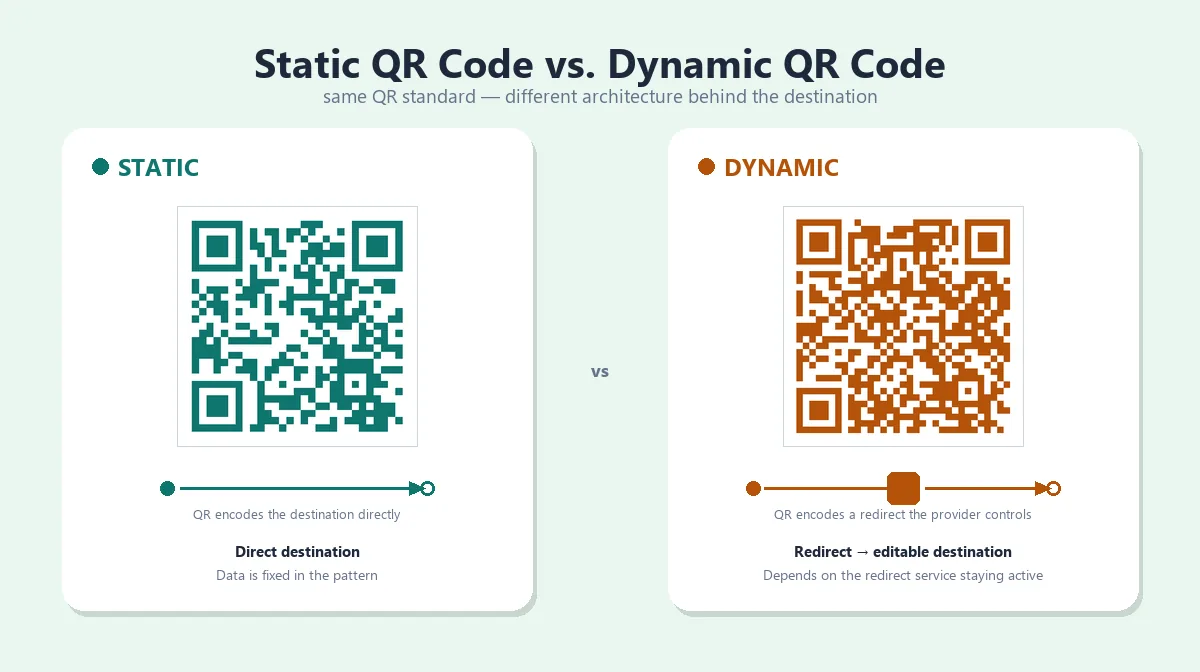
A static QR code encodes its data directly in the pattern — a URL, plain text, Wi-Fi credentials, or a contact card is stored inside the QR symbol itself. A dynamic QR code instead encodes a short redirect link that belongs to a provider's service, which forwards the scan to whatever destination is currently configured — so the destination can change later without touching the printed code.
Both produce the exact same kind of QR symbol; nothing in the QR code standard defines "static" and "dynamic" as separate formats. The difference is entirely in what gets encoded and what, if anything, sits behind it. Which one makes sense comes down to a few questions: do you need to edit the destination after printing, is scan data actually useful to you, and how much complexity are you willing to take on for that flexibility?
Static vs Dynamic QR Code: Quick Comparison
| Static QR Code | Dynamic QR Code | |
|---|---|---|
| How it works | Data is encoded directly into the QR pattern | QR encodes a short link to a provider's redirect service, which forwards to your real destination |
| Encoded content | The actual URL, text, Wi-Fi credentials, or contact card | A provider-controlled redirect link, not your final destination |
| Destination editable after printing? | No — a new destination means a new QR pattern | Usually yes, through the provider's dashboard |
| Requires a redirect/service? | No | Yes |
| Tracking capability | None built in | May offer scan analytics, depending on the provider |
| Provider dependency | None for the QR mechanism itself | Ongoing — depends on the provider's service and your account staying active |
| Best suited for | Fixed content unlikely to change | Content that may need updates, or when scan data is genuinely useful |
| Long-term considerations | The destination itself can still change or disappear | Continued operation depends on the provider, your subscription, and the redirect configuration |
What Is a Static QR Code?
A static QR code stores its payload directly in the grid of black-and-white modules that make up the symbol. When a scanner reads it, it's reading your actual data — no intermediary, no external server, no lookup involved. If the payload is a URL, that's the exact URL that gets decoded, every time, for as long as the printed image stays intact.
That's what makes static codes simple to reason about: the QR mechanism itself has no dependency on anything outside the printed pattern. ProURLMonitor's QR Code Generator builds static codes for this reason — a URL, text, Wi-Fi network, or vCard is encoded right into the pattern in your browser, with nothing sent to a server and nothing left to maintain afterward.
The trade-off is in the name: because the data lives inside the pattern, changing the destination means changing the payload, and that means the modules have to change — there's no way to edit a static code's content without generating a new symbol. Fine for content that won't change, like a fixed URL, a Wi-Fi password, or a vCard; a real limitation for anything you expect to update later.
None of this means a static QR code has a built-in expiration — it doesn't. What can stop it from being useful is the destination going away; see do QR codes expire for what that depends on.
What Is a Dynamic QR Code?
A dynamic QR code doesn't encode your actual destination — it encodes a short link that belongs to a QR platform's redirect service. Scanning it sends the phone to that provider's server first, which looks up the destination currently on file and forwards the scan there. The printed pattern only ever has to contain that one redirect link; where it ultimately goes lives in the provider's system, not in the code.
That indirection is what makes editing possible. Because the symbol encodes the redirect link rather than the destination, you can log into the provider's dashboard and point the redirect somewhere new — a different URL, a seasonal landing page, a corrected link — without reprinting anything. It's a service and infrastructure design, not a different kind of QR code; the symbol itself follows the same standard as a static one.
The flexibility comes with dependencies: continued operation relies on the provider staying in business, your account remaining active, and — on some plans — a subscription. Some providers include scan counts or basic analytics as part of that redirect layer, but that's a feature of the specific service, not something inherent to "dynamic" as a category — not every platform tracks scans, and not every plan includes it.
Static vs Dynamic QR Code — Key Differences
The table above covers the basics; these points are worth understanding in more depth.
Editing the destination
A static code has no edit path — the destination is part of the pattern, so a change means a new code. A dynamic code separates the two: the pattern stays fixed while the redirect configuration behind it changes.
Tracking and analytics
A dynamic code's provider sees the scan before forwarding it, enabling scan counts or device data on plans that offer it. A static code has no such visibility — data on visits has to come from analytics on the destination page itself, and only if you control that page.
Long-term reliability
A static code's reliability depends on one thing: whether the destination still exists. A dynamic code adds a link to that chain — the provider's infrastructure and your account both have to stay active too.
Cost and service dependency
Generating a static code is typically a one-time, no-cost action with nothing to maintain. Dynamic platforms commonly gate editing, analytics, or extra codes behind a paid tier beyond a limited free allowance.
Privacy considerations
A dynamic scan routes through a third-party server before reaching the destination, so that provider can see scan traffic — IP address, timestamp, sometimes device type. A static code has no such intermediary.
Maintenance
A static code needs none once printed. A dynamic code needs occasional attention — confirming the account is active and the redirect still points where it should.
Static QR Code Example
Say a restaurant generates a static QR code for https://example-restaurant.com/menu — an illustrative destination, not a real site — and prints it on table tents. Scanning that code will always decode to that exact URL; nothing about the pattern changes.
But "static" describes the QR code, not the web page it points to. If the restaurant controls example-restaurant.com, it can update what that page shows whenever it wants — swap the menu, change photos, even configure a server-side redirect elsewhere — without touching the printed code, because the code only ever encoded the URL, not the page's content. What it can't do is change the URL itself once printed; a different domain or path means generating and reprinting a new code.
Dynamic QR Code Example
Say a business sets up a dynamic QR code through a provider, and the printed code encodes something like qr-provider.example/abc123 — a hypothetical redirect link, not a real service. Scanning it redirects to whatever destination is currently configured, say business.example/summer-menu.
When the season changes, the business updates the redirect in the provider's dashboard to point at business.example/winter-menu instead. The printed code doesn't change — it still encodes qr-provider.example/abc123 — but scanning it now lands somewhere different, because the redirect configuration changed, not the code itself.
Can You Convert a Static QR Code to Dynamic?
Not directly — a QR code's payload is fixed once generated, so there's no way to take an existing static pattern and make it "become" dynamic while keeping the same modules. A dynamic code has to encode a provider's redirect link from the start; a static code that already encodes your destination directly doesn't have that layer built in.
There are two real paths, depending on what the static code already points to. If it encodes a URL you control, you get dynamic-like flexibility without a new QR code: set up your own server-side redirect there, or edit the page's content directly, since the code only ever locked in the address, not what's served. If it encodes a URL you don't control, plain text, Wi-Fi credentials, or contact details, there's no workaround — going dynamic means generating a brand-new symbol and replacing the old code wherever it was used.
Can You Edit a Dynamic QR Code?
Yes, but what you're editing is the redirect configuration on the provider's platform, not the QR code image itself. The pattern always encodes the same redirect link; editing changes where that link forwards to, typically through the provider's dashboard.
That means the printed code never has to be touched again after it's first generated — the modules stay identical no matter how many times the destination behind them changes. What varies is how much control a given provider offers: some allow unlimited edits, others restrict edits, analytics, or additional codes to paid tiers. None of that is standardized, so it's worth checking a provider's terms before relying on it for something you expect to update often.
Which Should You Choose?
Neither type is universally better — it depends on what the code needs to do over its lifetime.
Static tends to make sense when:
- The destination is final and unlikely to change
- Scan analytics wouldn't actually change any decision
- You want to avoid depending on a third-party service or subscription
- You're encoding something other than a URL — Wi-Fi credentials or a contact card, where "dynamic" doesn't apply
Dynamic tends to make sense when:
- The destination might change before the code is retired — a seasonal offer, a campaign page still in flux
- Scan data would genuinely inform a decision
- The code is already placed somewhere slow or costly to replace — packaging, signage, a large print run
- Managing many codes centrally matters more than avoiding a provider dependency
If a fixed destination is unlikely to move and scan data isn't something you'd act on, a static code removes an entire category of future problems. If you already know the destination will need to change, the provider dependency is a reasonable trade for not having to reprint.
Static vs Dynamic QR Codes for Printing
Both types are printed the same way, because both are the same QR standard — the pattern doesn't know or care whether it's static or dynamic. Size, resolution, contrast, and an intact quiet zone matter identically either way. For sizing, resolution, and material guidance, see our QR code printing guide.
What If a QR Code Stops Working?
Worth separating into three distinct failures rather than treating "it doesn't work" as one problem: the code might not be scanning at all (a physical or image issue), the destination might be gone (a static code's failure mode), or the redirect behind it might be down or deactivated (a dynamic code's failure mode). Each has a different fix, so it's worth confirming which one you're looking at.
For scan failures — blurry, pixelated, or unreadable codes — see why a QR code is blurry or won't scan. For destination and redirect failures, do QR codes expire covers what actually causes a working code to stop leading anywhere useful.
Create or Test a QR Code
To build a static code for a URL, Wi-Fi network, or contact card, ProURLMonitor's QR Code Generator creates one entirely in your browser, with no sign-up and no data sent to a server. To confirm any QR code — one you just made or an old printed one — still decodes correctly, the QR Code Scanner reads it from your camera or an uploaded photo.
Frequently Asked Questions
What is the difference between a static and dynamic QR code?
A static QR code encodes its destination or data directly in the pattern, so it never changes without generating a new code. A dynamic QR code encodes a short redirect link controlled by a provider, so the destination behind it can be updated later without reprinting — at the cost of depending on that provider's service staying active.
Which is better, static or dynamic QR code?
Neither is better in general — it depends on whether you need to edit the destination later. A static code is simpler and has no ongoing service dependency, which suits fixed content. A dynamic code trades that simplicity for the ability to update the destination and, on some providers, see scan analytics.
Can a static QR code be changed after printing?
Not the QR pattern itself — the data encoded in a static QR code is fixed once generated. If the code encodes a URL you control, though, you can still change what that web page shows, or set up a server-side redirect at that address, without touching the printed code.
Can you convert a static QR code to dynamic?
Not directly — you can't make an existing static pattern "become" dynamic. If the static code already points to a URL you control, you can add your own redirect there for similar flexibility. Otherwise, going dynamic means generating an entirely new QR code that encodes a provider's redirect link.
Can dynamic QR codes be edited?
Yes, but you're editing the redirect destination through the provider's platform, not the QR code image. The printed pattern stays the same; only where the redirect forwards to changes. Exactly how much you can edit, and whether it costs anything, depends on the specific provider.
Do static or dynamic QR codes expire?
Neither has a built-in expiration date — that's not part of the QR code standard. A static code can still stop being useful if its destination disappears; a dynamic code can stop working if the provider's redirect service, your account, or the destination goes away.
Can both static and dynamic QR codes be printed?
Yes — both use the same QR code standard, so the same printing considerations apply to either type: adequate size, resolution, contrast, and quiet zone.
Try Our Free SEO Tools
Put what you learned into action with our free SEO analysis tools.