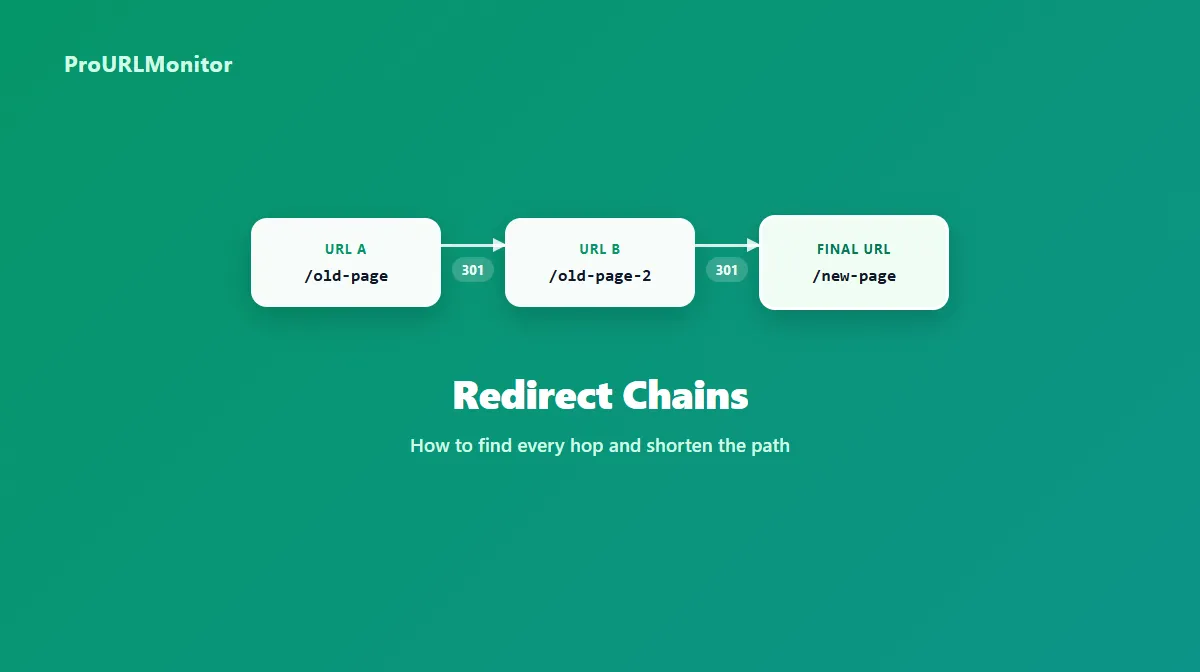
Redirect Chains: What They Are, Why They Matter & How to Fix Them
A redirect chain is what happens when a URL doesn't redirect straight to its final destination, but instead passes through one or more intermediate redirects first. The request still arrives somewhere — that's what separates a chain from a broken redirect loop — but it takes more hops than necessary to get there, and each one adds a little latency and a little more complexity to maintain.
Chains build up quietly. A URL gets renamed once, then renamed again during a later redesign, then wrapped in an HTTPS redirect during a security update — and nobody goes back to point the oldest version straight at the newest one. This guide covers what a redirect chain actually is, how it's different from a redirect loop, what typically causes one, and a practical process for finding and shortening them.
What Is a Redirect Chain?
A redirect chain occurs when a URL redirects through one or more intermediate URLs before reaching its final destination, instead of redirecting there in a single hop.
Direct redirect (one hop):
URL A → Final URL
Redirect chain (multiple hops):
URL A → URL B → URL C → Final URL
Each arrow in that second example represents a separate redirect response. URL A doesn't point at the final URL at all — it points at URL B, which points at URL C, which finally points at the real destination. A browser or crawler requesting URL A has to follow all three hops before it sees any actual content.
Every one of those intermediate stops (URL B and URL C above) is a real, valid redirect on its own. The problem isn't that any single hop is wrong — it's that the full path is longer than it needs to be, usually because URL A was never updated to point directly at the current final URL after it changed.
What Is a Redirect Hop?
A redirect hop is a single step in a redirect path: one request that gets back a 3xx status code (301, 302, 307, or 308) along with a Location header pointing to the next URL to try. A direct redirect is one hop. A redirect chain is simply two or more hops stacked in sequence before the request lands on a page that returns a normal response instead of another redirect.
Counting hops is the easiest way to describe how long a chain is: "a two-hop chain" means the request bounced through two intermediate redirects before reaching its destination.
Redirect Chain vs Redirect Loop
These two terms get mixed up often, but they describe different situations with different consequences.
| Redirect Chain | Redirect Loop | |
|---|---|---|
| Path | A → B → C → final page | A → B → A → B → ... |
| Reaches a final destination? | Yes, eventually | No |
| Typical result | Slower page loads, harder to maintain | Page never loads; browser gives up |
| What to investigate | Which hops are unnecessary and can be removed | Which redirect rule is pointing back at a URL already visited |
A chain is an efficiency and maintenance problem — the page still works, it just takes longer than it should. A loop is a hard failure: the request never reaches real content, and both users and search engines are blocked from the page entirely. If you're dealing with a URL that never resolves and shows a browser error like ERR_TOO_MANY_REDIRECTS, that's a loop, not a chain — see the Too Many Redirects troubleshooting guide for how to diagnose and fix that specific problem.
What Causes Redirect Chains?
Chains aren't usually the result of one mistake — they build up gradually, often for reasons that made sense at the time. Common causes include:
- A URL changed more than once over time. The original redirect from version one to version two never got updated when version two later moved to version three, so old links still pass through the middle step.
- An HTTP → HTTPS redirect stacked on top of another redirect. A URL might redirect from HTTP to HTTPS, and then separately from the old path to a new one, instead of doing both in a single hop.
- A www ↔ non-www redirect stacked on top of a path change. Similar to the HTTPS case — normalizing the host and changing the path happen as two separate redirects instead of one.
- An old URL points to a newer URL, which itself points to the newest URL. Common after a page gets renamed or consolidated more than once.
- CMS or plugin-managed redirect rules that were each added independently over time, without anyone checking whether they overlap with a rule already in place elsewhere.
- Site or domain migrations where the old domain's redirect map points at the previous site's URLs, which then redirect again to their current equivalents on the new domain.
- Inconsistent canonical host configuration, where different parts of a site's infrastructure disagree about which host (or protocol) should be treated as canonical.
- Overlapping redirect rules across layers — a CDN, an application, and a server config each handling part of a redirect, when one layer configured correctly could have handled the whole hop.
Not every chain is a mistake. A short, deliberate chain during a phased migration can be a reasonable short-term state. The goal generally isn't zero redirects — it's removing hops that serve no purpose once the underlying cause is understood.
Are Redirect Chains Bad for SEO?
The honest answer is: unnecessary chains are worth fixing, but the reasons are more grounded than some of the SEO claims you'll see repeated online.
Google's own crawl budget documentation advises site owners to "avoid long redirect chains, which have a negative effect on crawling." That's a real, current, specific piece of guidance — but it stops there. Google doesn't publish a percentage of lost ranking value, a specific crawl-budget cost, or a maximum number of hops that counts as "too long." Be skeptical of any claim that attaches a precise number to redirect chains — that's not something Google has published.
What is well established, without needing a specific statistic:
- Every hop adds a request. Before the browser or crawler ever sees real content, it has to make one more round trip than a direct redirect would require, which adds latency.
- Crawl efficiency matters more on large sites. Google's guidance on this exists specifically in the context of crawl budget for large sites — the practical impact of a chain scales with how much of a site's crawl budget is being spent on redirects instead of new or updated content.
- Chains are harder to maintain. A three-hop chain means three separate rules that all have to stay correct; if one breaks, the whole path can fail.
- Chains increase the odds of a broken path. Every additional hop is another place where a misconfiguration, an expired rule, or a migration mistake can turn a working redirect into a dead end.
None of this means every redirect is a problem — a single, necessary redirect (an HTTP → HTTPS migration, a permanent URL change) is a completely normal and safe part of running a site. The distinction that matters is between a redirect that's doing necessary work and one that's just an artifact of an earlier redirect nobody went back to clean up.
How to Find a Redirect Chain
The fastest way to see a URL's actual redirect path is to check it directly rather than guessing from the source code or server config. ProURLMonitor's Redirect Checker requests a URL, follows each redirect hop manually, and reports the status code and destination at every step — along with the final URL the chain resolves to.
A simple workflow:
- Open the Redirect Checker.
- Enter the URL you want to check.
- Run the check.
- Open View chain to inspect each hop in the redirect path.
- Review the status code and destination returned at every hop.
- Identify which intermediate URLs aren't the true final destination.
- Confirm the last URL in the chain is actually the page you intend visitors and search engines to land on.
The tool follows redirects up to a configurable depth (up to 20 hops), flags HTTP ↔ HTTPS transitions at each step, and detects loops separately from chains — so if a URL cycles back on itself instead of reaching a final page, that gets reported as a loop rather than a long chain.
Redirect Chain Example
The following is a fictional example for illustration, not a live measurement of any real site.
Say a page was originally published at a plain HTTP address, then the site moved to HTTPS, then later added a www prefix to its canonical host, and finally renamed the page itself. If each of those changes only redirected to the version that existed at the time, the result looks like this:
http://example.com/old-page
  → https://example.com/old-page
  → https://www.example.com/old-page
  → https://www.example.com/new-page
That's three hops before a visitor or crawler reaches real content — one for HTTPS, one for the www host, and one for the page rename. None of the individual redirects is wrong; they just accumulated instead of being consolidated.
Once the true final destination is known, the fix is to update the original URL's redirect rule to skip straight to it:
http://example.com/old-page
  → https://www.example.com/new-page
One hop, same outcome. Note that this example redirects to a www HTTPS address purely for illustration — whether www or non-www is the correct canonical host depends entirely on that site's own configuration, not on any universal rule.
How to Fix a Redirect Chain
Fixing a chain safely means understanding the current path before changing anything, then shortening it without breaking any legacy URLs that still need to keep working.
- Map the current redirect path. Run the affected URL through the tool and inspect the redirect path hop by hop.
- Identify the intended final destination. Confirm which URL in the chain is the real, current page — not just the last one the tool happened to stop on.
- Find where each redirect is configured. A chain often spans more than one layer (server config, CDN, CMS, application code), so the individual hops may not all live in the same place.
- Update old redirects to point directly to the final destination, rather than to an intermediate URL that itself redirects again. If you're not sure which status code the updated rule should return, see our 301 vs 302 redirect guide.
- Check internal links so they reference the current URL directly instead of relying on the redirect to get there.
- Check HTTP/HTTPS and host rules for overlaps that might be contributing an extra hop.
- Re-test the URL with the Redirect Checker to confirm the path is now shorter.
- Verify important old URLs still resolve correctly — shortening a chain should never mean an old, still-linked URL stops working.
Point Old URLs Directly to the Final URL
The core fix is updating each redirect rule so it targets the true final destination instead of an intermediate stop:
BEFORE:  A → B → C
AFTER:   A → C
         B → C   (B still needs to remain a valid redirect for anyone with an old link to it)
Notice that B doesn't disappear — it still needs its own redirect rule, because bookmarks, backlinks, or old internal references may point straight at B. The fix is removing the unnecessary extra hop from A's path, not deleting B's redirect altogether.
Update Internal Links
Once the final destination is confirmed, review the site's own internal links and make sure they point directly at that current URL rather than at an older URL that only reaches it by redirecting. ProURLMonitor's Internal Linking Assistant can help surface where existing content still references outdated URLs so you can update them directly. This won't guarantee a ranking change on its own, but it does mean visitors and crawlers reach the final page in one request instead of several every time they follow a link from within the site.
Review HTTP/HTTPS and www Rules
Chains frequently form because protocol and host normalization happen as separate redirects from a path or page change. Check whether the HTTP → HTTPS rule and any www ↔ non-www rule are combined with other redirects unnecessarily, and whether they're consistent across every layer that touches the request.
Check CMS, Plugin, CDN and Server Rules
Redirect logic can live in more than one place at once — a CMS's own URL settings, a redirect-management plugin, CDN-level rules, and server configuration files can each contribute a hop to the same request. Review each layer for the affected URL rather than assuming the whole path is controlled in one place, and avoid making changes to any single layer's configuration without understanding how the others interact with it.
How to Verify a Redirect Chain Is Fixed
After making changes, check each redirect hop again rather than assuming the fix worked. Look for the path to now reach the intended destination using the minimum number of redirects actually necessary for that URL — that might be zero hops, or it might legitimately be one, depending on whether a redirect is still required at all. The goal isn't that every URL must have no redirects; it's that any redirect still in place is doing real work rather than passing through a stop that could have been skipped.
If the same chain-shortening fix applies to a whole template or URL pattern rather than one page, verify it across every affected URL at once with the Bulk Redirect Checker instead of rechecking pages one at a time.
Redirect Chain Best Practices
- Point legacy URLs directly to their current, correct destination rather than to an intermediate URL that redirects again.
- Update internal links to reference current URLs instead of relying on a redirect to reach them.
- Keep HTTP/HTTPS and host (www/non-www) rules consistent across every layer of your stack.
- Build and review a redirect map explicitly during any site or domain migration, rather than layering new rules on top of old ones.
- Periodically recheck important redirected URLs, especially ones with meaningful backlinks or traffic.
- Preserve redirects that are still genuinely needed for old, external, or bookmarked URLs — shortening a chain doesn't mean removing every step in it.
Frequently Asked Questions
What is a redirect chain?
A redirect chain is what happens when a URL redirects to another URL, which redirects to another URL, and so on, before finally reaching a page that returns real content. Instead of one hop from the original URL to the final destination, the request passes through one or more intermediate stops along the way.
How do I find a redirect chain?
Use a tool that follows a URL's redirects one hop at a time and reports the status code and destination at each step. ProURLMonitor's Redirect Checker does exactly this — paste in a URL and it shows every hop, the status code returned at each one, and the final destination, so you can see the full path at a glance.
What is a redirect hop?
A redirect hop is a single step in a redirect path — one request that receives a 3xx status code and a Location header pointing to the next URL. A direct redirect is one hop. A redirect chain is two or more hops before the request reaches a final, non-redirecting response.
What is the difference between a redirect chain and a redirect loop?
A redirect chain eventually reaches a final destination, even if it takes several hops to get there. A redirect loop never reaches one — it cycles back to a URL already visited and never resolves. A chain is a maintenance and efficiency issue; a loop is a hard failure that stops the page from loading at all.
Are redirect chains bad for SEO?
Google's own crawl budget documentation advises site owners to avoid long redirect chains because they have a negative effect on crawling. Beyond that, every extra hop adds latency for real visitors and makes a site's redirect setup harder to maintain and reason about. A single necessary redirect is normal and not a problem; the goal is avoiding unnecessary intermediate hops, not eliminating redirects entirely.
How do I fix a redirect chain?
Map the full existing path with a redirect checker, identify the true final destination, then update each old URL's redirect rule so it points directly to that destination instead of to an intermediate URL in the chain. Update internal links to the final URL as well, then recheck the URL to confirm it now resolves in the fewest necessary hops.
How many redirects are too many?
There's no universal number that makes a chain officially "too many" — the practical goal is to remove any hop that isn't necessary, whether that's one extra hop or several. Separately, browsers and crawlers do enforce their own technical limits on how many redirects they'll follow before giving up, but that's a different question from what's advisable for SEO and site maintenance.
Try Our Free SEO Tools
Put what you learned into action with our free SEO analysis tools.